



100 Pound Social Review (2026): How It Manages Your Posts
SUMMARY
The £125 Basic plan buys 12 original posts and publishing across two profiles. A second profile does not double the number of ideas. See how the monthly batch works, what two short videos add to the bill, and when a small business would be better served by buying creative or scheduling posts itself.
Sofia Bennett
Contents

At £125 a month plus VAT, 100 Pound Social is worth considering if you want someone to write, design and publish regular posts for your business. Basic covers 12 original posts across two profiles. If what you need is a video of each new product, price those videos separately before signing up. Adding two short videos buys two more pieces. Spending the same £60 on carousels changes the format of posts you already paid for.
100 Pound Social at a glance
| Buyer’s question | Answer |
|---|---|
| What stays on my desk? | You supply upcoming offers and any shop photos you want used. Once the UK team has written and designed the posts, you approve them in the calendar. The agency handles scheduling and publication. |
| What does the first plan cost? | £125 a month plus VAT for 12 originals, with two profiles included. |
| Who gets the most from it? | A small service business with recurring topics and nobody available to keep its social calendar moving. |
| What costs extra? | Short videos, carousel upgrades and someone to handle comments and messages, among other options. |
| How do customers rate it? | Clutch shows 4.8 out of 5 across two client reviews. These were business-to-business engagements. |
What is 100 Pound Social?
100 Pound Social is a subscription service for businesses that want a team to prepare social posts and put them on the calendar. For the monthly fee, the team writes captions, designs graphics and schedules the approved material for your chosen profiles. Each plan includes a monthly performance summary. The company also sells LinkedIn prospecting and blog writing separately.
Suppose your print shop wants to explain the difference between coated and uncoated paper. The same explanation can run on Facebook and LinkedIn, with small formatting changes, as one original. If you want a paper comparison for Facebook and a separate case study for LinkedIn, those use two originals.
What you get from brief to publication
Give the writer material a customer would recognise
The agency's sample onboarding form asks for up to ten subjects your customers would find interesting, publications the writer could draw on and any events or offers coming up in the next four weeks. One of its sample posts uses a picture of drinks cans against a yellow background to introduce a marketing concept. The form distinguishes these topical posts from material promoting your business. That distinction is worth settling before the writer starts. How much of the month should explain your field, and how much should show your work?
The print shop is a hypothetical example. A stock image of paper suits a general post about choosing a finish. For a post selling wedding invitations, I'd send a close photo of the actual impression in the card, taken with light coming across the surface. A flat picture of the front can make a letterpress invitation look like an ordinary printed one. Give the writer a sentence about what the customer can see in that photo. The caption can then point out where the lettering sinks into the paper.
Approve one batch and keep a way to change it
The agency describes a roughly ten-day setup and an editable calendar. Its approval and publishing process gives you a chance to look over the posts before they go live. The plans include one consolidated round of revisions per monthly batch. A single person at the business who can check dates and collect corrections will get more from that round than three people sending changes independently.
Suppose the print shop has packed five paper colours into its sample envelope. The scheduled photo still shows six, including a navy sheet the shop can no longer supply. In the revision notes, attach a photo of the five sheets and ask the writer to remove navy from the caption. If the only photo on hand shows the old pack, move that post back until you can photograph the envelope a customer will actually open.
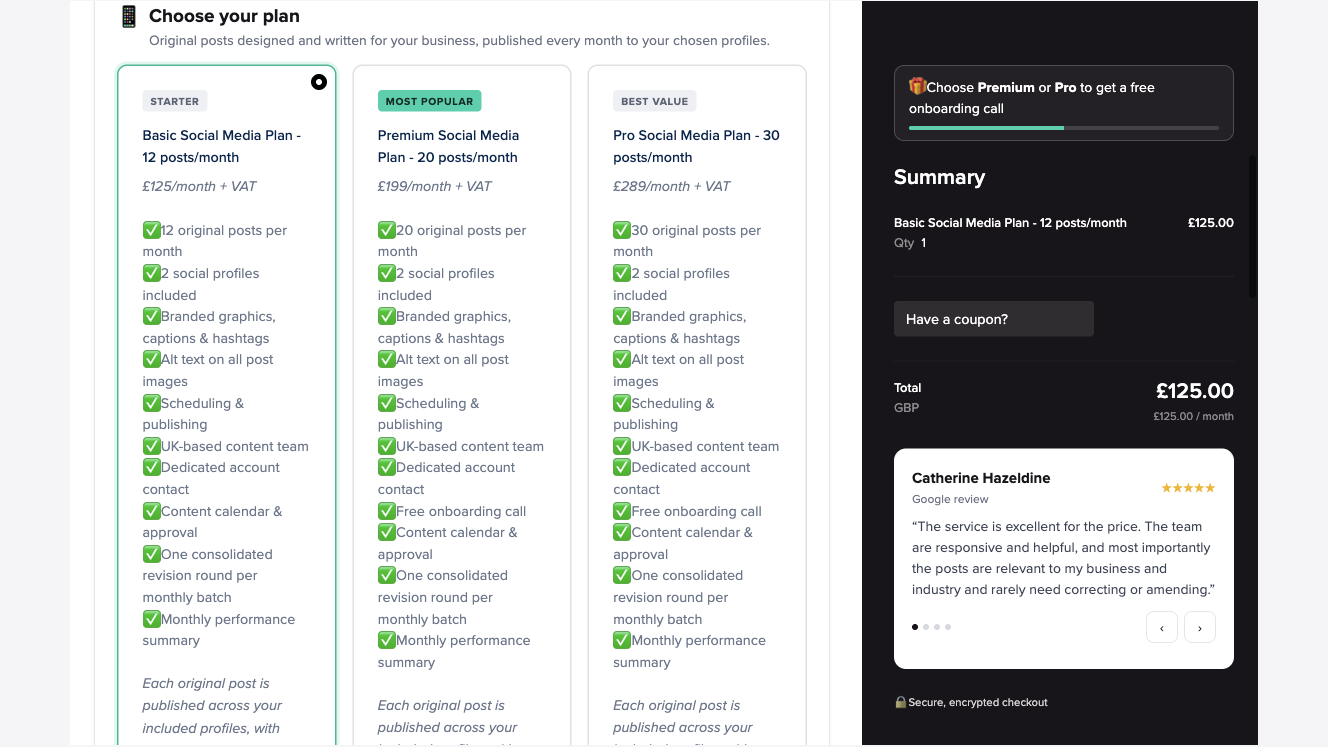
The Basic plan card lists the monthly revision round. Premium and Pro add an onboarding call.
What the public order form and client reports show
I checked the public order form on 12 November 2026. I selected Basic and tried two separate configurations, removing the first add-on before selecting the second. Each time, the monthly total changed from £125 to £185 before VAT. This check covered the quote and the included work. I did not commission content or time a delivery.
Basic with two short videos. Adding the £60 video pack kept all 12 original posts and added two videos of up to 30 seconds each. The agency can work with footage you supply or with stock, and the pack includes one revision round. If a customer needs to see how your press lays ink on a sheet, ask whether your phone clip shows the roller making contact. Stock footage can illustrate printing in general but can't establish what your own machine does.
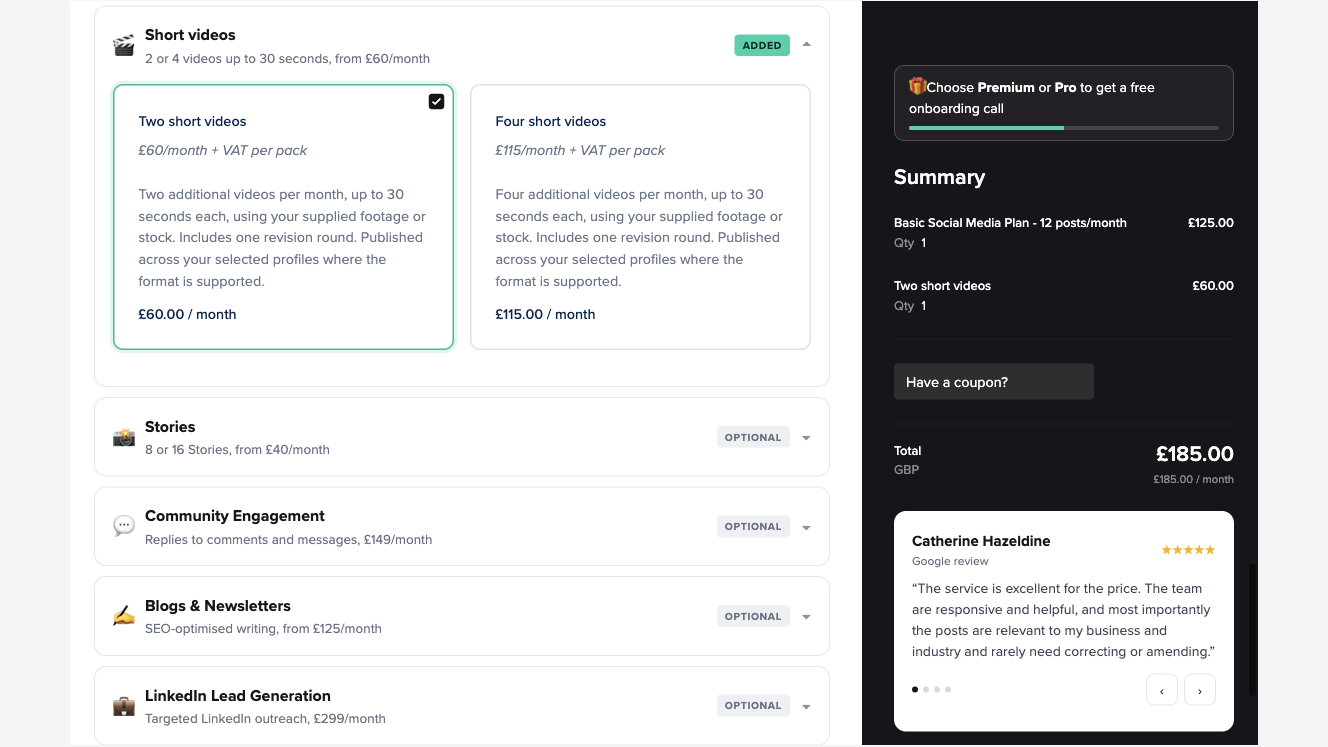
The two videos are additional pieces. The form gives the length limit, footage options and revision allowance.
Basic with two carousel upgrades. I removed the video pack and selected two carousels. The £60 now paid for two of the 12 included posts to become carousels, with up to five slides apiece. There were still 12 originals in the month's allowance. This configuration suits a print shop with several close-ups to compare, such as the same invitation on three paper stocks.
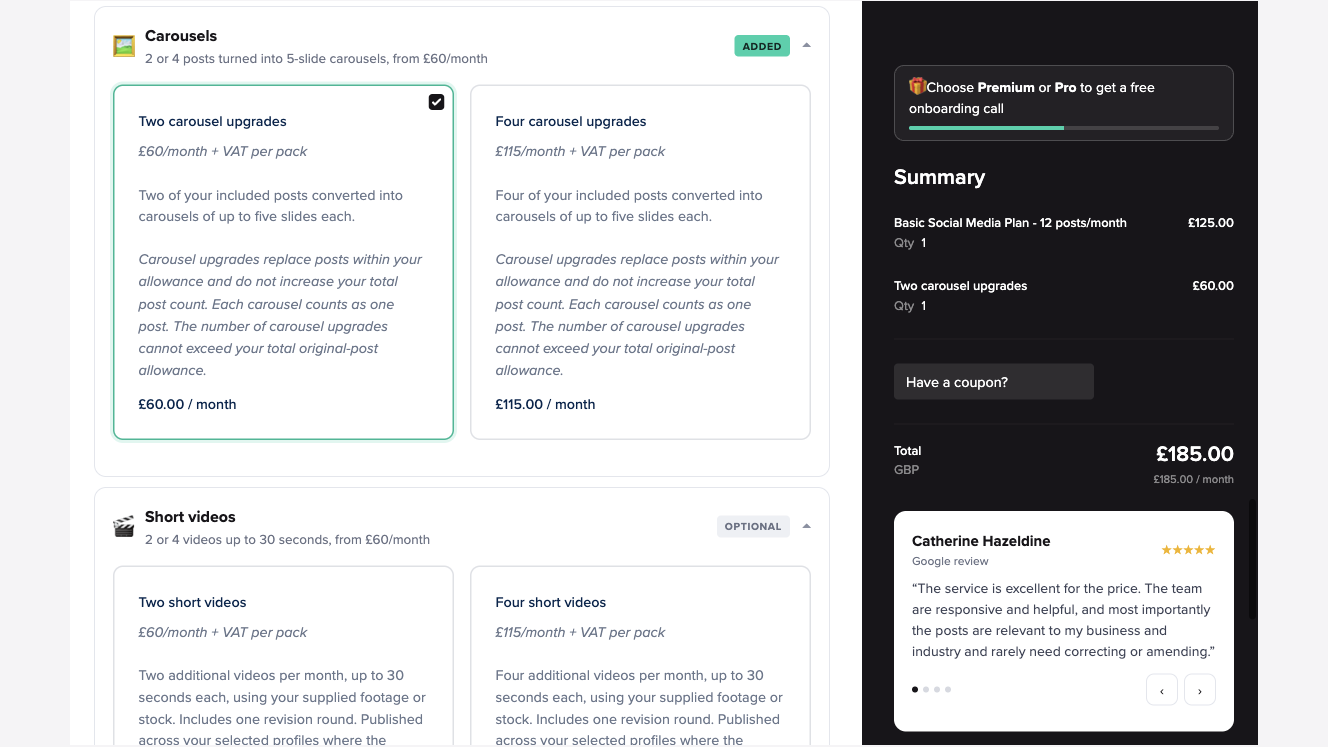
Each upgraded carousel uses one of the original post slots, regardless of how many slides it contains.
The two client reviews on Clutch offer a glimpse of delivery. Equal Experts' head of mobile described reviewing a month's LinkedIn content at once and keeping a profile active between other commitments. A software development client also valued having little work to do after the brief, but raised a concern about explaining a specialist subject to a general audience. Both clients describe work completed by 2021. For a business that sells expertise, I'd ask to see a post that explains one difficult idea in the buyer's own field.
How much do the plans and extras cost?
| Monthly plan | Price before VAT | Original posts | Included profiles | Onboarding call |
|---|---|---|---|---|
| Basic | £125 | 12 | 2 | Listed on higher tiers |
| Premium | £199 | 20 | 2 | Included |
| Pro | £289 | 30 | 2 | Included |
Divide the base fee by the original post allowance and the figures are about £10.42, £9.95 and £9.63 per original, respectively. Each figure includes the work of scheduling and publishing. Dividing by 24 for Basic because the posts can appear on two profiles would make the writing and design look cheaper than they are. For a business that wants different writing on each channel, work out how many of those 12 slots each channel needs.
If you want more originals, compare the extra-post packs with the next tier. Five additional originals cost £55 a month, bringing Basic to £180 for 17. Ten extra cost £105, bringing Basic to £230 for 22. Premium gives you 20 for £199. If 20 will cover your calendar, moving up a tier costs £31 less than putting ten extras on Basic. If 17 is enough, Basic with the smaller pack is £19 cheaper than Premium.
Budget separately for the inbox. Community Engagement is £149 a month on top of the plan. The order form describes up to one hour a week across two profiles, with checks at least twice a week. Sales leads, complaints and sensitive questions come back to the business. If your customers send messages asking whether you can deliver tomorrow, someone in the shop still needs to own that conversation.
The agency's published prices and billing FAQ describe monthly billing, a 20-day money-back window from sign-up and 30 days' notice to cancel after that window. Put the sign-up date next to the first review date in your calendar. A refund period starting on the day you pay gives you fewer than 20 days with the finished posts in front of you.
Where the service earns its fee and where it falls short
Advantages
- Publishing is included even on Basic. A small consultancy can approve a month's work at once and have it go out during client meetings and holidays. It can still post an unscheduled update of its own.
- You can budget for a specific mix of formats. An owner can see the difference between an additional video and an upgraded carousel in the order form, without arranging a sales call.
Limitations
- Each channel draws from one pool of originals. Six posts written only for LinkedIn leave six originals for the rest of the month.
- Batch approval takes work inside the business. When a special changes daily or two people must sign off on a price, a monthly revision round leaves a gap. Decide who will make last-minute edits and who has authority to pull an inaccurate post.
- Specialist visuals require material from you. The video pack specifies supplied or stock footage. If customers choose your work by its stitching, colour or finish, factor in getting a usable shot of that detail.
Which owners should buy it or skip it?
Buy Basic if prospects check the social profiles of your accounting practice before making contact and your team rarely finds time to post. Twelve well-briefed explanations give the writer room to address recurring questions. It can also suit a local service firm that runs the same workshops each month. Dates are known early enough to review as a batch, and the team can publish while the owner teaches.
Skip the base plan if your clothing shop relies on a new try-on clip for every arrival. Count the videos you need and price the footage work first. A restaurant taking time-sensitive reservations through direct messages has a different problem. Publishing a menu post won't reserve a table, and even the engagement add-on specifies periodic checks. The person who can see today's bookings should keep that inbox covered.
Alternatives if you need a different part of the job done
For owners who want fresh visuals from photos they already have. Stillmore, which publishes this review, offers a creative subscription for independent businesses and brands. Its team picks suitable shots from your existing photos of products, premises or people, along with other brand photography. You can choose a style from its video examples for ecommerce products or leave that decision to the team. They plan and produce finished videos or images with captions on an ongoing basis. You decide when to post them.
For finished posts waiting in a folder. Buffer gives you a calendar and queue for posts you already write and design. It fits an owner who likes making the posts and wants to schedule a few at a time. Someone on your side still needs to make the next batch.
Verdict: is 100 Pound Social worth it?
I'd choose the £125 plan for an owner whose main problem is getting useful posts written and published week after week. Before buying, sketch a month with twelve squares and write one subject in each. Mark where the same post can serve both profiles and circle anything that needs a video. If the squares fill up with two entirely different sets of stories, price a larger allowance. If most are photos you already have and want turned into finished creative, Stillmore's library shows what that work can look like. Browse the Inspiration library.
Frequently asked questions
Does 100 Pound Social still cost £100 a month?
The listed Basic social media plan starts at £125 a month plus VAT. It includes 12 originals, two profiles and publication. With no add-ons, the order form showed £125 before VAT.
Do two profiles mean 24 different posts?
No. Basic includes 12 original posts. Each can appear on both profiles with small formatting adjustments. A different piece of original content for one of the profiles uses another slot.
Can I approve the posts before they go live?
Yes. The team makes the monthly batch available in an editable calendar. Each plan includes one consolidated revision round for that batch. You can gather comments from colleagues and send them together.
Are videos included in Basic?
Videos have a separate charge. The £60 monthly pack adds two videos of up to 30 seconds each using supplied or stock footage. A £60 two-carousel pack instead upgrades two existing posts.
Is there a free trial?
The company advertises a paid subscription with a 20-day money-back guarantee from sign-up. After that period its billing FAQ specifies 30 days' notice to cancel.
Who should look for an alternative?
If you have finished posts and only need a queue, a scheduling tool may cover the job. If you have product photos and want finished images or videos you can post yourself, look for a creative service that works from those photos.

About the author
Sofia Bennett
I'm Sofia Bennett, and I write about video production and visual storytelling for small teams: planning a short video, choosing useful source photos, sequencing shots, pacing, and captions that people can actually read. My interest is in the decisions that are invisible when they are right and obvious when they are wrong. What belongs in the opening? Where does a sequence lose clarity? Which detail needs another look before publishing? Any example I use comes from a real project or is constructed to make a single point, and I say which. When a walkthrough only works because of a good source photo, I point that out rather than letting the result look easier than it is.
Give them a reasonto stop by.
Send us your phone photos. Get posts ready to share.
See what we can make
Keep exploring
All stories ↗- Social media
What Is Evergreen Content? Examples for Small Businesses
Evergreen content is information that stays useful long after you publish it because people keep coming back with the same question. To find a subject for your shop, listen for a decision each new customer has to make, such as whether a mug handle will fit their grip. A side view and an in-hand photo can answer that question as long as they show the shape you still sell. Check price tags, links and product changes before sharing an older post. A pottery shop could give its mug photos to Stillmore for a finished image or short video with a caption. The owner confirms the product details and chooses when and where to publish.
- Social media
Stillmore vs Feedbird: Who Makes the Post and Who Publishes It?
Stillmore makes content for a shop that wants to do its own posting, while Feedbird can make the posts and publish them for you. A ceramics shop can give Stillmore photos of a new mug and receive a finished image or video with a caption, ready to share when the pieces go on sale. You can pick the visual style yourself or leave that choice to the team once your photo library meets your plan's requirements. With Feedbird, someone at the shop still needs to approve the work and connect the account where it should appear. To compare costs, ask both companies to price the same mix of images and videos, then check the billing period and who will handle posting.
- Social media
7 Custom Cake Advertising Ideas From Your Photos
Use the cake photos already on your phone to show what a customer can order. Seven post ideas pair a specific picture with a caption that asks for the date, servings, design, and pickup details you need for a quote.