



7 Custom Cake Advertising Ideas From Photos With Stillmore
SUMMARY
Use the cake photos already on your phone to show what a customer can order. Seven post ideas pair a specific picture with a caption that asks for the date, servings, design, and pickup details you need for a quote.
Lan He
Contents

The customer who sends a screenshot of your prettiest birthday cake and asks “How much?” has picked a design. Stillmore can help you build a post around that picture so the next person knows what to ask for. Pull up the original photo and the notes from that order. The photo gives customers a design to point to. Your notes tell you which details to ask for before you quote. These seven custom cake advertising ideas work with pictures you already own, including the ones you took just before closing the box.
Show one birthday cake a customer can ask for by name
Pick a cake you would happily make again next weekend. Look for a whole-cake photo where someone can see the shape and finish on a phone, then give the design a short, descriptive name. “Pink shell border” works even if the original had a birthday message written across it. In the caption, tell people what they can change. Try “Like the pink shell border? Pick the piping color and tell me the words you want on top. Send your party date and guest count and I’ll check what size will fit the message.”
Give Stillmore the uncropped photo and identify the feature that needs to stay in frame. A tight crop of the top can cut off the matching shells around the base. If the name on the original belongs to a child, choose a different angle or a photo of another cake with the same finish. Keep a copy of the picture under the name you used in the post. When someone asks about the pink shell border a month later, you can pull up the design you both mean. The team’s photo selection and review are part of the Stillmore creative workflow.
Give a guest count its own photo caption
Someone planning an office birthday may know that eighteen people will be in the break room and have no idea what diameter to order. Choose a cake whose size and intended servings you recorded. Use the count from that order and explain how you expected it to be cut. If you sent it out with instructions for small party slices, say so. A photo of a tall cake on a small stand leaves plenty of room for a customer to imagine a larger portion than you had in mind.
Here’s a caption to adapt if it matches your records. “There were eighteen places at the table for this office cake. Planning dessert for your team? Tell me how many people are coming and whether cake is the only dessert.” Send Stillmore the serving note along with the picture so the number appears in the caption. For a real example of how a bakery handles the question, Whipped Bakeshop’s birthday cake guide asks customers for their guest count so its decorators can recommend a size.
Put the filling beside the finished cake
The front of an ivory cake with pink piping tells a customer very little about what they’ll taste. Pair it with a cut slice from the same recipe. If you have only a test-bake photo, label it as a sample of that flavor and say which order it goes with. A tasting slice of raspberry and vanilla can help someone choose their birthday filling even if the cake you delivered went out whole. Check the recipe notes before naming the filling. Pink buttercream and raspberry jam can look much the same in a phone photo.
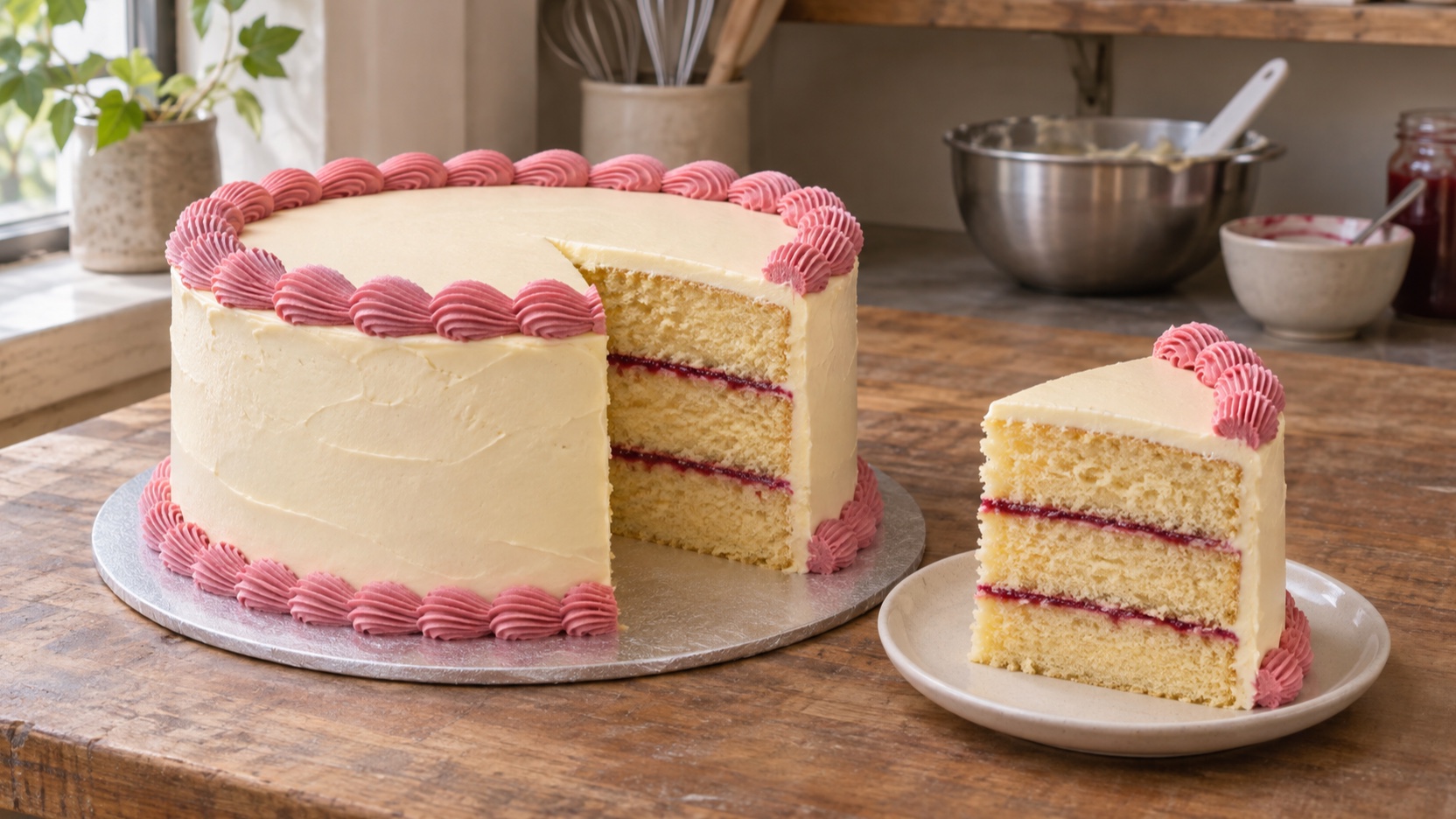 Illustrative example. The slice shows what the buttercream hides.
Ask Stillmore to keep enough of both pictures in the frame for the buyer to recognize the outside and see the layers. For a caption, try “Pink on the outside, vanilla and raspberry inside. Would you like that filling for your cake? Send me the date, servings and the finish you liked.” Offer a second filling only if you can supply it for the date. If they choose raspberry, you can price the filling along with the finish.
Offer two finishes a customer can choose between
Find two cakes of comparable size in your camera roll. One might have buttercream swoops made with the back of a spoon, the other a piped border with individual bows. Choose a photo of each taken from roughly the same height. Show them side by side, with a plain name beneath each picture. Imagine someone texting you from the grocery store, trying to describe “the pink one on the left.” A name like “ribbon bows” is easy to type into a message.
Tell Stillmore which differences matter to the quote. If the bow cake takes longer to decorate, mention that in the copy and invite the customer to ask about the finish that suits their budget. “Which would you put on the birthday table, soft swoops or ribbon bows? Send me the finish you like, your date and the number of slices you’ll need.” Read the post with one photo covered. Each name should still describe its own cake if someone forwards only that half of the image.
Show what the starting price buys
Look through your albums for the simplest cake you currently make at your advertised starting price. A picture of that cake belongs beside the price, even if a taller cake with sugar flowers is the photo you like best. Write down what the pictured option includes, using your current menu. That might be one round cake, a plain buttercream finish and a short message. If flowers or a topper cost extra, show the base version first and give the decorated version its own caption.
Before you send the photos to Stillmore, read the caption as a buyer who wants everything in the picture. Would they expect the stand to come with it? Did the customer supply the topper themselves? A short note can settle either question. “Our buttercream birthday cake starts at [your price] for [your size and finish]. This one has a customer-supplied topper. For a quote on yours, send your guest count, date and any extras you’d like.” Replace the brackets before you publish and edit the post if the starting offer changes. If you sell a stand rental as well, give it a separate line. Someone borrowing a family stand can then tell you to leave that charge off the quote.
Advertise one open pickup window
An opening in the decorating schedule is a good reason to bring back a picture of a cake you’ve already posted. Check what you can finish for that slot. If Friday afternoon leaves time for a plain border and a short message, show a cake with those details. Save the three-tier design for a week when you can take it on. Put the calendar date beside the day of the week and include your pickup neighborhood so someone seeing a shared post can tell whether the trip works.
When Stillmore prepares the artwork, ask for the date and pickup time to appear together. Check your calendar again before publishing. Use wording such as “Friday [date], afternoon pickup in [neighborhood]. I have room for a buttercream birthday cake with a piped border. Message me your guest count to check the slot.” When it fills, update the caption and any pinned copy. If you’re planning a whole holiday order period, Stillmore’s restaurant holiday promotion ideas cover other ways to organize a dated food offer.
Put a quote request on the last slide
Give people who have already picked a cake a message they can copy. Put the photo on the first slide and leave the last one for the request. The fields on Snooky’s cake order form include the event date, servings, design and pickup or delivery. Take the same approach with your caption. If you only offer pickup, ask which collection window they can make. If you deliver some orders, ask for the venue or neighborhood so you can check the trip.
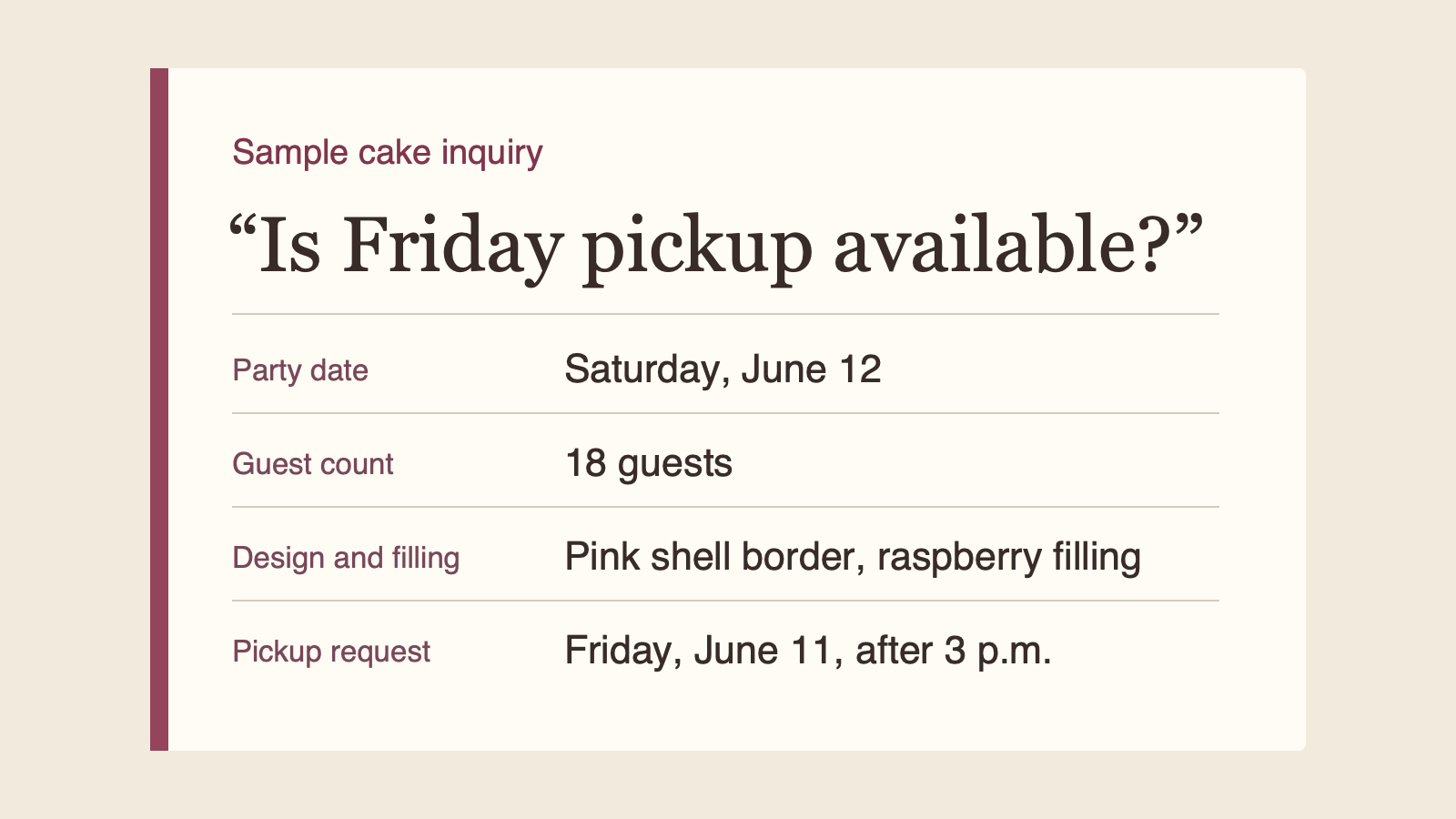 Illustrative inquiry. The pickup request comes a day before the party.
Give Stillmore the wording you want copied. “I’d like the pink shell border for [date], for [number] people. I’d like [filling] and can pick up [day/time]. Is that available?” Try it yourself from your phone as soon as you publish. If the picture sends people to a form, make sure the form lets them identify the cake they saw. A field for the design name saves you from sending your entire gallery back to someone who already chose.
Where cake ads go wrong
A price under the wrong picture, an old pickup date and a tiny label hiding the filling can each send someone into your inbox with the wrong expectation. When a new inquiry arrives, note which post the person saw and which detail you had to ask for again. If several replies to the same photo omit the date, move the date request earlier in its caption. Track how many inquiries have enough information for a quote and, separately, how many become bookings. Keep the post name with the order so you can find the photo when you quote a similar cake.
Choose a cake for your next post
Pick one photo of a cake you can make again. Find the size in your order notes, name the finish and decide which pickup dates you can offer. If you want the Stillmore team to turn those details into artwork and a caption you can publish yourself, browse the food and drink inspiration and choose a look that gives your cake room on the screen.
Frequently asked questions
What should I post if I have only one cake photo?
Use the whole photo first and a crop of one detail next. The same border or inscription can anchor both posts. Give each caption a different job, such as choosing a finish or checking a date.
Should a custom cake ad include a price?
Include a price when customers can order the pictured size and finish at that price. For bespoke work, explain which details you need before quoting.
Can I use a customer’s photo of the cake being cut?
Ask the person who took the photo for permission to use it in your advertising. If party guests appear, a close crop of the slice or your own test-bake photo may suit the post better.

About the author
Lan He
I'm Lan. Years of writing promotional and editorial work in the US, mostly for companies with big audiences and bigger expectations — where a single article might reach hundreds of thousands of readers, and where the good ones kept earning traffic long after the campaign ended. I learned what makes a page survive that: one clear audience, one real question, images that show the actual work, and a structure that keeps people reading. Now I write for small business owners who do everything themselves, answering the questions they actually ask: what's worth posting, which photos are worth taking, and how to tell one story across images, video, and words. I've seen good content carry a small company further than its ad budget ever did.
Give them a reasonto stop by.
Send us your phone photos. Get posts ready to share.
See what we can make
Keep exploring
All stories ↗- Social media
Restaurant Holiday Promotion Ideas to Make With Stillmore
Restaurant holiday promotion ideas for independent owners with food photos and little time to make content. Choose from five practical formats, adapt a complete fictional pickup-post example, and plan an announcement, cutoff reminder and sold-out message. Includes photo checks, caption templates and one clear customer action for each promotion.
- Social media
Outsource content creation: a small business guide
Outsourcing content creation means hiring someone outside your business to make a specific piece, such as an article or a product video. A café promoting its lunch special, for example, could send Stillmore a clear photo of the dish, its name, and the hours it’s available. The team turns suitable photos into a promotional image or video, writes the accompanying caption, and checks the work before delivery. The café owner checks the details against that day’s menu, then publishes the post. This handoff makes sense when you know what you’re selling and who it’s for, but editing keeps getting pushed aside. If you’re still choosing between bringing people in for lunch and taking advance orders, settle that first so the caption tells customers what to do.
- Social media
Short-Form Video Explained: From Views to Visits (2026)
You have products worth showing, but making a video is another job on an already full day. Start with the detail a customer would stop to look at: a pastry's filling, a jacket's texture, or the space they could book for dinner. This guide pairs a real restaurant example with practical ideas for your own business, explains when a photo is enough, and shows what to send Stillmore so the team can handle production. You will also know which inquiries and orders to track after posting.