



Stillmore vs Vidpros: Photos vs Video Editing (2026)
SUMMARY
Written for small business owners and lean teams deciding how to outsource ongoing social content, this guide compares Stillmore and Vidpros using official plan terms verified on November 18, 2026. It breaks down how photo-first image and short-video production starting at $29/month compares with raw-footage video editing subscriptions starting at $1,000/month across eight dimensions, pricing economics, pros and cons, scenario verdicts, and six FAQs.
Contents

Choose Stillmore if you have business photos and want ongoing social images, short videos, and accompanying copy created for you from $29/month; choose Vidpros if you already record raw video footage and need high-volume post-production from $1,000/month. Stillmore operates as an advertising creative agency for independent businesses that skips filming altogether. Vidpros runs a fractional video editing subscription built for creators, brands, and agencies supplying camera clips.
Stillmore vs Vidpros at a Glance
The table below summarizes the published plan terms I verified across both services' official pricing and help pages on November 18, 2026.
| Feature | Stillmore | Vidpros |
|---|---|---|
| Starting monthly price | $29/mo (Try it); $129/mo (Growth Monthly) | $1,000/mo (Starter) |
| Annual / launch terms | Growth Annual $99/mo equivalent ($1,188 billed annually); launch offer active | Month-to-month billing; cancel anytime |
| Entry option | Try it ($29/mo for 3,000 credits) | $100 1-week trial (up to 10 shorts or 1 long-form) |
| Monthly output | Try it: 1 video or 6 images; Growth: up to 6 videos or 36 images | Starter: 20–40 shorts (≤60s) or 5–10 long-form (≤15m) |
| Primary client input | Existing product, space, or brand photos | Recorded footage (≤60m raw per long-form) or stock requests |
| Published turnaround | Published Growth automatic-creation cadence: 1 finished video every 5 days | Posted targets: overnight on Starter/Growth; same-day on Scale |
| Revision model | Pre-delivery team review and error fixes on standard tiers; agreed scope on Custom Studio | No cap on rounds, but each round deducts from monthly output |
| Rollover / reset terms | Unused Plan Credits accumulate up to 2 months' allocation (6,000 / 36,000); Add-on Credits do not expire | Monthly output resets each cycle; no rollover |
| Publishing handoff | Client downloads finished assets and posts directly | Edited files delivered; videos can go direct to YouTube on approval |
Head-to-Head Across 8 Key Dimensions
1. Starting Inputs & Production Model
This category is a tie because each service starts from a different asset. Stillmore begins with still photographs—product shots, storefront views, or team portraits stored in your Library. You either let the team select photos and styles automatically (once your Library holds at least 3 photos on Try it or 15 on Growth) or pick a style yourself from Inspirations. Its creative production workflow pairs creative direction, production tools, and a pre-delivery team check without asking you to shoot video. Vidpros starts from recorded video files: a long-form edit up to 15 minutes draws on up to 60 minutes of raw footage, while editors assemble cuts, pacing, stock audio, and video captions.
2. Deliverables, Formats & Social Readiness
Stillmore wins when you want finished still graphics, short videos, and social post copy from one account. One credit pool covers both finished videos (3,000 credits) and finished images (500 credits), so Growth's 18,000 monthly credits can fund up to 6 videos, up to 36 images, or a blended schedule such as 4 videos and 12 images. Stillmore also plans, checks, and delivers accompanying copy alongside the visuals, letting a business use an Instagram content creation service for its posts without writing from scratch. Vidpros publishes video-first plans covering short-form edits up to 60 seconds and long-form videos up to 15 minutes, paired with stock video, stock music, and automated video captions rather than standalone still-image graphics or written social copy.
3. Long-Form & Raw-Footage Editing Depth
Vidpros wins on multi-minute editing depth, and Stillmore does not compete in this lane. If you already record talking-head YouTube episodes, multi-camera interviews, podcasts, online courses, or detailed product walkthroughs, Vidpros is structured for that workload. Its plans explicitly cover podcasts, vlogs, and tutorials up to 15 minutes—with lightly edited podcasts exceeding 60 minutes of raw footage counting as two long-form slots—scaling from 5–10 long-form edits on Starter ($1,000/month) to 20–40 on Scale ($4,000/month). Stillmore's standard plans do not accept raw camera footage to cut long-form episodes.
4. Owner Effort & Creative Direction
Stillmore demands far less ongoing production effort from a busy owner. You upload existing phone or store photos once to your Library, browse selectable styles in Inspirations when promoting a new item, or hand ongoing creative selection to the team. In a hypothetical example, a neighborhood bakery introducing a seasonal pastry can either choose an Inspiration style and attach a few counter photos, or leave existing storefront and product shots in Library for scheduled creation. Vidpros removes the editing bottleneck, yet you still provide recorded clips or brief the editor on stock footage, and review cuts. For creative elements, Stillmore relies on its Inspiration styles and team curation, whereas Vidpros pairs stock video and music with design templates for intros, end cards, and lower thirds without promising custom motion graphics.
5. Pricing, Entry Cost & Unit Economics
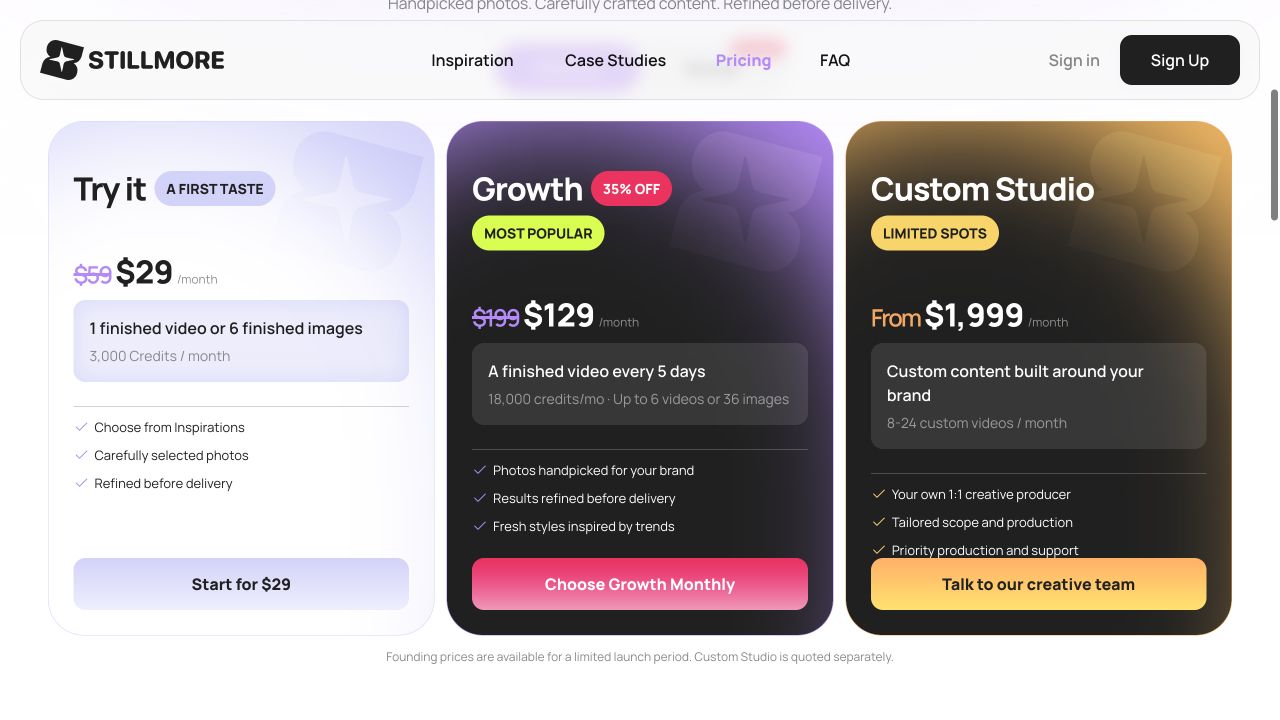
Stillmore wins on entry affordability, while Vidpros targets budgets built for high-volume editing output. On November 18, 2026, I opened the Stillmore pricing page, where Annual was pre-selected and displayed Growth at $99/month ($1,188 billed annually, listed as 50% off $199). When I switched the toggle to Monthly, Growth updated to $129/month with the same 18,000-credit monthly allowance, alongside Try it at $29/month (3,000 credits, down from $59) and Custom Studio starting at $1,999/month (8–24 custom videos). One-time Add-on packs run from $6 (500 credits) to $270 (30,000 credits).
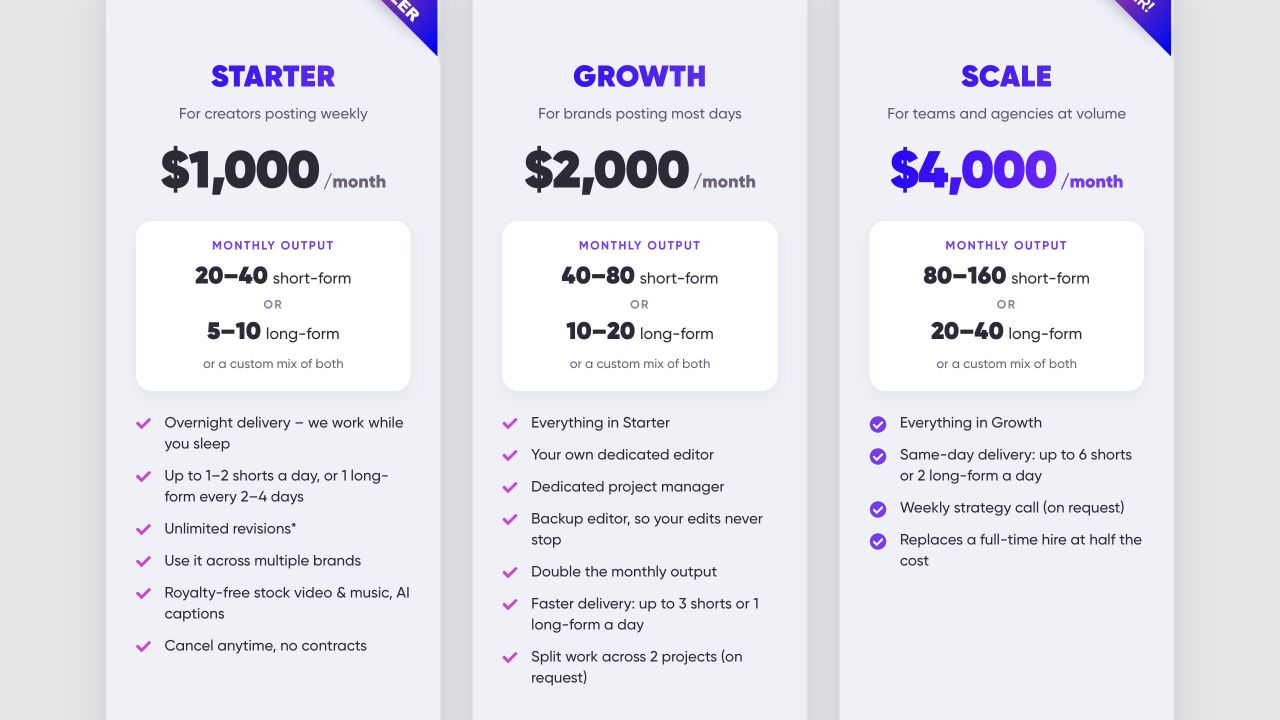
On the Vidpros pricing page, monthly plans start at $1,000/month for Starter (20–40 shorts or 5–10 long-form), $2,000/month for Growth (40–80 shorts or 10–20 long-form), and $4,000/month for Scale (80–160 shorts or 20–40 long-form), plus an optional $100 one-week trial. As a hypothetical budget estimate before any revision rounds, Starter works out to $25 to $50 per short-form edit if you supply enough footage for 20 to 40 shorts and use no slots on revisions ($1,000 ÷ 40 = $25; $1,000 ÷ 20 = $50). On Stillmore, Growth Monthly works out to $21.50 per video at 6 videos ($129 ÷ 6), and Try it is $29 for one video.
6. Turnaround Speed & Posted Cadence
Vidpros holds the advantage for fast post-production turnaround on ready footage under its posted schedule. Because the two services handle different jobs—turning still photos into new creative assets versus cutting submitted video—their timelines reflect different production rhythms rather than measured speed on identical inputs. Stillmore's published schedule for automatic creation on Growth is one finished video every 5 days once the Library minimum and suitable materials are ready, rather than a uniform turnaround guarantee for every Growth request. Vidpros lists overnight delivery on Starter (up to 1–2 shorts per day or 1 long-form every 2–4 days), up to 3 shorts or 1 long-form daily on Growth, and same-day delivery on Scale (up to 6 shorts or 2 long-form daily), noting that complex or animated edits fall toward the lower end of monthly output ranges.
7. Revisions, Proofing & Asset Retention
Vidpros wins for client-directed editing revisions, structured proofing, and dedicated team staffing at higher tiers. When I scrolled past Vidpros's Starter, Growth, and Scale cards to read the pricing footnote on November 18, I saw a key trade-off: Vidpros places no hard cap on revision rounds, yet each revision round counts toward your monthly output allowance (including during the $100 trial week). Even so, Vidpros pairs editing with Frame.io proofing—where Frame.io's client share-link documentation notes that viewers can pause playback to leave timestamped comments alongside regular feedback when commenting is enabled—provides 3 months of project storage, caps editors at 4 clients each, and assigns a dedicated editor, project manager, and backup editor on Growth and Scale. Stillmore relies on internal team review and error correction on Try it and Growth, reserving producer-led revision scopes for Custom Studio.
8. Scalability, Reset Terms & Agency Fit
This dimension splits by workflow: Vidpros wins for agencies and multi-brand video teams scaling high-volume edits, while Stillmore wins on credit retention. Vidpros supports multiple brands on Starter, splits work across 2 projects on Growth upon request, adds weekly strategy calls on Scale, and offers a private white-label option delivered under an agency's own brand—though unused monthly output resets each billing cycle with no rollover. Stillmore scales from 1 video ($29/month) to 6 videos ($129/month billed monthly) or custom campaigns ($1,999/month+). Unused Plan Credits accumulate up to a balance cap equal to two monthly allocations (6,000 credits on Try it; 36,000 on Growth), which is a balance cap rather than a two-month expiration, while purchased Add-on Credits never expire. When planning around outsourcing content creation, white-label client video teams fit Vidpros, whereas independent businesses turning stored photos into regular posts fit Stillmore.
Where Each Service Excels and Falls Short
Stillmore
Where it excels:
- Photo-first creation: Produces social images, short videos, and accompanying copy from existing business photos, eliminating the need to film video clips.
- Accessible small-business tiers: Entry plans sit well below video-editing retainers, with flexible mixing between images and short videos plus rollover up to two months' credit allocation.
- Low weekly oversight: Lets you choose Inspirations directly or turn on automatic creation so the team picks photos and checks quality before delivery.
Where it falls short:
- No raw-footage editing: Built for still photos rather than assembling podcasts, talking-head interviews, or multi-minute YouTube cuts.
- Steady rather than overnight pacing: Published automatic creation on Growth spaces videos out on a 5-day cadence instead of daily overnight turnarounds.
- Limited revision flexibility on entry tiers: Try it and Growth include pre-delivery team refinement and clear error fixes rather than client-directed aesthetic rounds.
Vidpros
Where it excels:
- Rapid post-production targets: Offers overnight turnaround on Starter and Growth, stepping up to same-day delivery on Scale.
- True long-form capability: Edits up to 15-minute videos from up to 60 minutes of raw footage, alongside short-form clips, stock audio and video, and automated video captions.
- Agency and team depth: Caps editors at 4 clients each, includes 3 months of project storage and white-label delivery, and adds a dedicated editor, project manager, and backup editor on Growth and Scale.
Where it falls short:
- High monthly commitment: A $1,000/month minimum after the trial week can strain low-volume or occasional social posters.
- Depends on footage supply: Requires steady raw video inputs (or stock-heavy briefs) to justify 20 to 160 monthly edits.
- Revisions eat into output and unused slots reset: Every revision round deducts from monthly volume, and unspent output does not carry over.
Choose Stillmore vs Choose Vidpros: The Verdict
Pick Stillmore if you have business photos and want ongoing social images, short videos, and accompanying copy without filming; pick Vidpros if you record video footage consistently and need 20 to 160 fast-turnaround edits a month.
Choose Stillmore if...
- You run a shop, café, product brand, or local service with everyday photos on your phone and no time to shoot or edit video. For a neighborhood store or solo founder without a filming routine, Stillmore turns existing product and space photos into steady posts without adding production chores.
- You want predictable monthly content under $150/month that covers both still images and short videos from one credit balance, with rollover up to two months' plan allocation.
Choose Vidpros if...
- You already film podcasts, YouTube episodes, courses, or founder clips and want editors turning raw recordings into long-form and short-form videos.
- You manage an agency or multi-brand channel that justifies $1,000 to $4,000/month for overnight or same-day delivery, Frame.io proofing, white-label delivery, and dedicated team staffing.
For a small business starting with existing product or shop photos and needing ongoing social posts, Stillmore is my clear first choice. Its team takes your saved photos, selects what to make, produces and checks each image or short video, and supplies matching captions so you can publish without running a shoot or managing an editing queue.
Frequently Asked Questions
Is Stillmore cheaper than Vidpros?
Yes, in monthly subscription cost. Under the launch rates checked on November 18, 2026, Stillmore starts at $29/month for Try it and $129/month for Growth Monthly ($99/month equivalent when billed annually at $1,188), compared with Vidpros Starter at $1,000/month. As a hypothetical pre-revision estimate, Vidpros Starter works out to $25 to $50 per short if you supply enough footage for 20 to 40 shorts and spend zero slots on revisions ($1,000 divided by 40 or 20).
Can I use Stillmore or Vidpros if I only have product photos?
Stillmore is built specifically to produce social images, short videos, and accompanying copy from existing product, storefront, and team photos. Vidpros is a video-editing subscription designed around recorded raw footage (using stock video and design templates as secondary options), so it is not structured to run ongoing social campaigns solely from a small folder of your product photos.
How do revisions compare between Stillmore and Vidpros?
Stillmore checks and refines content before delivery and fixes clear production errors on Try it and Growth, while Custom Studio ($1,999/month and up) includes agreed revision scopes with a dedicated producer. Vidpros places no cap on revision rounds across its plans, though its pricing footnote states each revision round counts toward your monthly output allowance, including during the $100 trial week.
How fast do Stillmore and Vidpros deliver finished videos?
Vidpros lists faster post-production turnaround on submitted footage: overnight delivery on Starter and Growth, and same-day delivery on Scale (with complex or animated edits landing toward the lower end of output ranges). For automatic creation on Growth, Stillmore lists a normal published cadence of one finished video every 5 days once Library minimums and suitable materials are in place, rather than guaranteeing that pace for every Growth request.
What happens to unused monthly edits or credits?
With Stillmore, unused Plan Credits stay available and can accumulate up to a balance cap equal to two monthly allocations—6,000 credits on Try it or 36,000 credits on Growth—which is a balance cap rather than a two-month expiration, while purchased Add-on Credits never expire. With Vidpros, unused monthly output resets each billing cycle and does not roll over.
Who handles posting content to social media accounts?
With Stillmore, the team delivers finished images, videos, and accompanying copy to My Creations and notifies you by email so you can download and publish posts on your own schedule without sharing account passwords. Vidpros positions itself as a video editing subscription rather than a multi-channel social management agency; its homepage notes only that edited social videos can go direct to YouTube upon your editing approval.

About the author
Sofia Bennett
I'm Sofia Bennett, and I write about video production and visual storytelling for small teams: planning a short video, choosing useful source photos, sequencing shots, pacing, and captions that people can actually read. My interest is in the decisions that are invisible when they are right and obvious when they are wrong. What belongs in the opening? Where does a sequence lose clarity? Which detail needs another look before publishing? Any example I use comes from a real project or is constructed to make a single point, and I say which. When a walkthrough only works because of a good source photo, I point that out rather than letting the result look easier than it is.
Give them a reasonto stop by.
Send us your phone photos. Get posts ready to share.
See what we can make
Keep exploring
All stories ↗- Social media
What Are TikTok Ads? In-Feed Formats and Creative Guide
TikTok ads are paid placements delivering video, image, or interactive product content across feeds, search, and partner placements. This guide focuses on auction In-Feed Ads, covering Spark and Non-Spark formats, file specs, budget settings, and pre-launch creative preparation. Independent merchants learn how to check product clarity, cleared commercial music, landing-page alignment, and photo-first production before spending on ads.
- Social media
Restaurant Social Media: Plan a Week of Posts From Your Photos
Plan restaurant social media around one business goal, accurate photos and a clear publishing responsibility. A takeout post needs an ordering destination and pickup details; a reservation post needs the right booking page and service information. Choose a voice that fits the venue, whether that is a practical lunch message or a more detailed invitation for an evening out. Name the actual dish and confirm that it is available before describing it. Stillmore's team can use existing photos to prepare images or videos with accompanying captions, while the restaurant retains control of publication. Start with a manageable weekly plan, vary the purpose when reusing photos, and check the finished content against current menu facts. Review destination activity and business records separately, without treating views or clicks as orders.
- Social media
50 Pound Social Review 2026: Plans, Costs and Limits
50 Pound Social can handle routine social posting, but its £50 plan covers only one weekly post on one platform. Compare its current packages, video scope, customer reviews and approval terms to decide which work you need taken off your list.