



What Are TikTok Ads? In-Feed Formats and Creative Guide
SUMMARY
TikTok ads are paid placements delivering video, image, or interactive product content across feeds, search, and partner placements. This guide focuses on auction In-Feed Ads, covering Spark and Non-Spark formats, file specs, budget settings, and pre-launch creative preparation. Independent merchants learn how to check product clarity, cleared commercial music, landing-page alignment, and photo-first production before spending on ads.
Contents

TikTok ads are paid promotional placements purchased through TikTok's advertising platform to deliver video, image, or interactive product content to targeted users across feeds, search, and partner placements.
While TikTok supports several ad categories, not all full-screen or video-based, this guide focuses on auction In-Feed Ads (Spark and Non-Spark video formats) and how independent businesses prepare creative before launch.
TL;DR: Key Takeaways
- Two In-Feed formats: Spark Ads boost existing organic TikTok posts from your account or an authorized creator, while Non-Spark In-Feed Ads upload directly inside TikTok Ads Manager.
- Target vs. upload floor: Non-Spark vertical 9:16 specs allow uploads starting at 540x960 pixels, whereas TikTok creative guidance recommends 720P resolution or higher with cleared sound and safe-zone margins.
- Settings vs. actual spend: Ads Manager minimum budgets govern account configuration, not mandatory daily charges or fixed view rates.
- Prep before buying: Confirm one campaign goal, offer, landing URL, and cleared audio track before producing creative.
What Are TikTok Ads and How Do They Differ From Organic Posts?
A TikTok ad is a paid placement set up in TikTok Ads Manager to reach defined audiences beyond your current followers. An organic post publishes free to your profile grid for feed discovery, whereas a paid ad targets goals like website traffic, leads, or sales with clickable buttons linking to a site, booking page, or app. Compared with broader social media content formats, In-Feed TikTok ads sit inside a vertical, sound-on stream rather than beside a static article.
Clear boundaries prevent wasted work. Not every business video is an ad, and not every TikTok ad is a vertical video. Shaping clips, audio, and captions is creative prep, whereas targeting, tracking, and bidding belong to media buying. Lock one brief upfront with your goal, offer, landing URL, success metric, and launch owner.
Where TikTok Advertising Came From and Why It Matters Now
TikTok opened self-serve advertising to smaller businesses on July 8, 2020, when TikTok For Business launched its global self-serve platform alongside a $100 million Back-to-Business ad credit program.
Self-serve access matters for independent merchants today because small shops can set up campaigns directly in Ads Manager under published budget settings. Under TikTok's creative guidance, performance ads do not require broadcast polish. A natural or DIY style, clear early messaging, and landing-page alignment help creative fit the feed.
How TikTok Ads Work in Practice: Formats, Specs, and Creative Prep
Independent businesses starting with TikTok auction In-Feed placements choose between Spark Ads and Non-Spark In-Feed Ads. Spark Ads boost an organic post from your profile or an authorized creator, keeping engagement and new followers on that post while pulling up to four caption lines. Non-Spark Ads upload in Ads Manager without appearing on your profile grid; clicks on the caption, profile photo, nickname, or button go to your landing page, and captions display in uniform white text without clickable hashtags or @ mentions. Before producing files, review Non-Spark specs, TikTok creative best practices, TikTok minimum budget rules, and the budget and bidding FAQ:
- Upload floor vs. creative target: June 2026 Non-Spark specs allow 9:16 uploads from 540x960 pixels (16:9 at 960x540; 1:1 at 640x640),
.mp4,.mov,.mpeg,.3gp, or.avifiles up to 500 MB, at least 516 kbps bitrate, and up to 10 minutes (Spark docs list conflicting limits, "No restrictions" versus 10 minutes, so verify in Ads Manager). For quality, TikTok recommends 720P resolution or higher, 9:16 framing, sound, a hook within 6 seconds (and your proposition within 3 seconds), 5-10 words per second for text overlays, and placement-specific safe-zone templates since captions and anchors shift visible boundaries. - Budget settings vs. actual spend: July 2026 rules list campaign minimums above $50 and ad-group daily minimums above $20 ($20 times scheduled days for lifetime), while August 2026 guidance allows No Limit campaigns with ad-group budget controls. Treat these as configuration settings, not mandatory daily charges or fixed view rates, and check current UI wording.
Inspect final exported files rather than compressed web previews. For instance, Stillmore, an advertising creative agency for independent businesses turning existing photos into ready-to-post videos, images, and captions, displays public zoom reveal video examples. One clip zooms from a wide poolside pinch frame to a Chanel-branded beauty bottle six seconds later. This clip is an observed framing example only, not a live TikTok campaign or brand endorsement, and its 405x720 preview sits below Non-Spark's 540x960 floor and 720P creative target. Film real footage whenever customers need live physical motion, and run this four-part handoff check before approving files:
- Early product clarity: Show the product clearly within 3-6 seconds with accurate shape, color, and readable packaging.
- Cleared audio and music: Confirm clear voice or sound and commercial music rights for your placement and region. General library tracks are excluded from commercial ads, so filter pre-cleared tracks inside TikTok's Commercial Music Library using its placement and region filters.
- Offer and URL match: Align visuals, call to action, and proofread captions with your destination page.
- Export and safe-zone check: Confirm 720P or higher output, required bitrate and file-size limits, and placement-specific safe-zone margins.
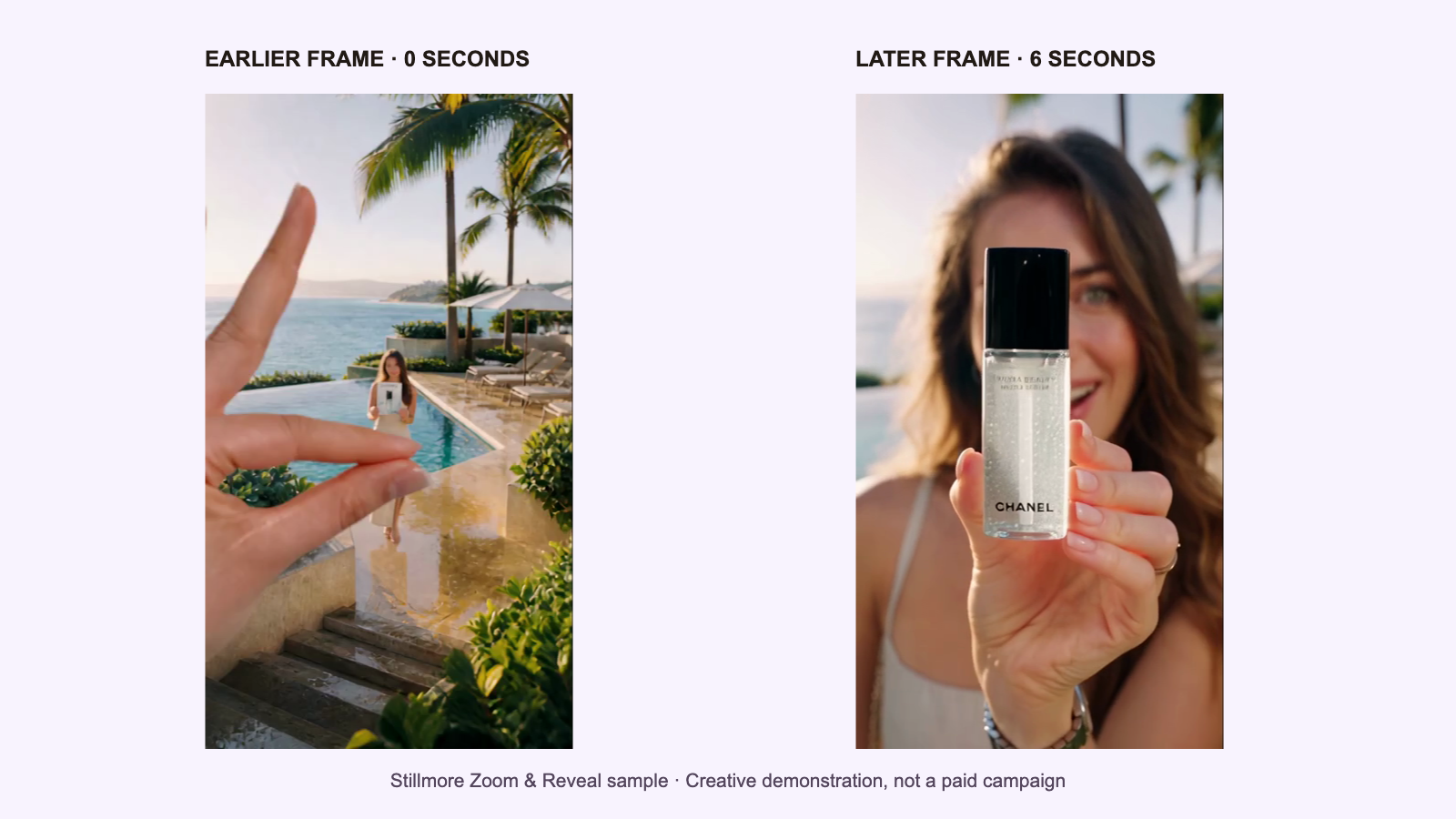
Frames: Stillmore Zoom & Reveal sample. Creative demonstration, not a paid campaign or evidence of brand affiliation.
How Photo-First Creative Preparation Differs From Traditional Ad Shoots
Independent businesses typically weigh filming on a smartphone, editing in mobile apps, or using a photo-first agency. Smartphone shoots are essential when buyers must see live cooking, pouring, or product mechanics, while photo-first production fits shops with clear existing photos that want ready-to-post vertical videos and captions without learning editing software.
| Comparison Factor | Phone or Location Video Shoot | DIY Mobile Editing Apps | Stillmore Photo-First Production |
|---|---|---|---|
| Starting Materials | Raw smartphone or camera footage | Existing clips or stills assembled by owner | Clear product, storefront, or team photos |
| Workload & Control | Owner or shooter handles lighting, takes, framing | Owner controls pacing, text, music, exports | Agency handles concepts, selection, production, checks |
| Best-Fit Use Cases | Proving live function, texture, or real process | Quick edits when owner has editing time | Turning stills into vertical showcase clips |
| Pre-Launch Checks | Owner reviews clips for clarity and audio | Owner verifies safe zones, specs, music rights | Agency checks product accuracy; owner confirms Ads Manager specs |
Which Independent Businesses Use TikTok Ads and Common Use Cases
Independent retailers, restaurants, and appointment-based services can test TikTok In-Feed Ads for seasonal offers or local awareness. Before buying media, a merchant pairs one fixed offer and destination URL with two distinct creative openings to see which angle earns real customer action.
- Worked hypothetical plan (skincare boutique, Non-Spark concept comparison): A boutique launching a vitamin C serum uses product showcase video style photography with one fixed offer ("15% off your first serum") and product URL. All ingredients, concentrations, and physical traits below are assumed example facts a merchant must verify against real packaging and product pages. Variant A (routine-reminder hook): Opens (0-3s) with "Ready to restock your morning serum?" over a region-cleared Commercial Music Library track; moves (3-8s) to a bottle close-up with two verifiable, nonmedical overlays ("30 mL amber glass bottle" and "Fragrance-free formula"); ends (8-12s) with "Shop 15% off today." Variant B (label-detail hook): Keeps the same offer and URL, opening (0-3s) on a label close-up ("15% L-ascorbic acid, fragrance-free," an assumed example spec) before shelf context and the same call to action. Film smartphone footage instead of stills if buyers must see serum consistency or dropper dispensing. In this hypothetical plan, confirm that purchase attribution is working before relying on cost per attributed purchase (tracking installation is outside this guide). Compare both angles over comparable test windows and audiences using cost per actual purchase (ad spend divided by attributed purchases) and landing-page visits, without declaring a winner from views or likes or claiming causal proof.
- Neighborhood cafe (hypothetical scenario): A cafe promoting weekend brunch pairs plate and patio photos with one brunch offer and reservation link, filming phone clips if showing latte art pouring.
- Local hair salon (hypothetical scenario): A salon seeking weekday bookings turns client look photos and studio shots into vertical videos with cleared commercial music and a booking link.
How to Start Preparing Creative for TikTok Ads
Separating campaign setup from creative prep prevents rushed launches inside Ads Manager.
- Lock your brief first: Write down your goal, exact customer offer, landing URL, primary success metric, and launch owner.
- Audit photos or film real motion: Gather clear product, storefront, and team photos so you can reuse photos with Stillmore across future ads, or film a quick clip if buyers need a live demonstration.
- Prepare visuals, audio, and handoff checks: Pick a vertical motion style, confirm Commercial Music Library clearance for your placement and region, and run the four-part check on product clarity, offer match, and captions.
- Verify Ads Manager readiness: Confirm 720P or higher exports, safe-zone alignment, proofread Spark captions if used, and budget settings before spending.
Conclusion
TikTok In-Feed Ads give independent businesses a structured path to run Spark or Non-Spark vertical videos once the offer, destination URL, cleared audio, specs, and budget settings are checked upfront. Separating creative prep from media buying, and comparing focused variants against actual purchases or bookings, prevents wasted setup. If you already have clear product or shop photos, visit Stillmore to turn them into ready-to-post videos and captions while you stay in control of publishing and ad spend.
Frequently Asked Questions About TikTok Ads
How much does a TikTok ad cost?
In TikTok Ads Manager, ad costs depend on auction bids and configured budgets rather than a flat production fee. July 2026 rules list campaign minimums above $50 and ad-group daily minimums above $20, while August 2026 guidance lets campaigns use No Limit with ad-group controls. Minimums are configuration settings, not guaranteed charges or fixed view rates.
Are TikTok ads worth it for a small business?
TikTok ads can be worth testing when you have a clear offer, a working landing page, and margins that support testing above Ads Manager's budget floors. Independent shops can publish clips organically first to check message clarity, then compare paid test variants by tracking landing-page visits, bookings, or sales against ad spend.
What is the difference between Spark Ads and Non-Spark In-Feed Ads?
Spark Ads boost an existing organic post from your profile or an authorized creator account, keeping views, engagement, and new followers on the original post. Non-Spark In-Feed Ads upload inside Ads Manager without sitting on your profile grid, display plain white captions without clickable hashtags or mentions, and route clicks to your landing page.
What are the official TikTok ad specs for aspect ratio and size?
June 2026 Non-Spark auction In-Feed specs set a 9:16 vertical floor of 540x960 pixels (16:9 at 960x540; 1:1 at 640x640), using .mp4, .mov, .mpeg, .3gp, or .avi files up to 500 MB, at least 516 kbps bitrate, and up to 10 minutes. For creative quality, TikTok recommends 720P resolution or higher.
Can I make TikTok video creatives from existing product photos?
Yes. If you have clear product, storefront, or team photos, a photo-first creative agency like Stillmore can turn them into vertical videos and captions checked by a production team before delivery. Confirm final file dimensions inside Ads Manager before launching Non-Spark ads, and film real footage whenever buyers need to see live product motion.
Why can't I edit my caption when setting up a Spark Ad?
When boosting an existing authorized organic post as a Spark Ad, TikTok pulls the display name and up to four lines of the original caption, including emojis, directly from that post. Under TikTok's Spark Ads specifications, that original organic caption cannot be edited inside Ads Manager after authorization, so proofread before authorizing.
Does Stillmore set up or manage my TikTok Ads Manager account?
No. Stillmore works as your creative production partner, selecting photos from your Library, planning styles, producing vertical videos, images, and captions, and checking finished work before delivery. You keep full ownership of your social profiles and ad accounts, choosing when to publish organically or upload approved files into TikTok Ads Manager.

About the author
Lan He
I'm Lan. Years of writing promotional and editorial work in the US, mostly for companies with big audiences and bigger expectations — where a single article might reach hundreds of thousands of readers, and where the good ones kept earning traffic long after the campaign ended. I learned what makes a page survive that: one clear audience, one real question, images that show the actual work, and a structure that keeps people reading. Now I write for small business owners who do everything themselves, answering the questions they actually ask: what's worth posting, which photos are worth taking, and how to tell one story across images, video, and words. I've seen good content carry a small company further than its ad budget ever did.
Give them a reasonto stop by.
Send us your phone photos. Get posts ready to share.
See what we can make
Keep exploring
All stories ↗- Social media
Stillmore vs Vidpros: Photos vs Video Editing (2026)
Written for small business owners and lean teams deciding how to outsource ongoing social content, this guide compares Stillmore and Vidpros using official plan terms verified on November 18, 2026. It breaks down how photo-first image and short-video production starting at $29/month compares with raw-footage video editing subscriptions starting at $1,000/month across eight dimensions, pricing economics, pros and cons, scenario verdicts, and six FAQs.
- Social media
Restaurant Social Media: Plan a Week of Posts From Your Photos
Plan restaurant social media around one business goal, accurate photos and a clear publishing responsibility. A takeout post needs an ordering destination and pickup details; a reservation post needs the right booking page and service information. Choose a voice that fits the venue, whether that is a practical lunch message or a more detailed invitation for an evening out. Name the actual dish and confirm that it is available before describing it. Stillmore's team can use existing photos to prepare images or videos with accompanying captions, while the restaurant retains control of publication. Start with a manageable weekly plan, vary the purpose when reusing photos, and check the finished content against current menu facts. Review destination activity and business records separately, without treating views or clicks as orders.
- Social media
50 Pound Social Review 2026: Plans, Costs and Limits
50 Pound Social can handle routine social posting, but its £50 plan covers only one weekly post on one platform. Compare its current packages, video scope, customer reviews and approval terms to decide which work you need taken off your list.