How to photograph a shiny product label without glare
SUMMARY
A reflection can show the curve of a jar or hide the words a customer came to read. Two photographs of the same Nutella product show the difference. Use them to judge a bright streak on your own packaging, then try a pair of shots beside a window. The guide walks through keeping the label square, checking one line at phone size, and choosing between a tighter crop and a fresh photo before you send the files to an editor.
Lan He

Contents
Put the product beside a window, switch off your phone’s flash and watch the reflection as you turn the package a little at a time. Stop when the bright patch clears the words a customer needs to read. A highlight along the rim can stay. It’s the highlight over the lettering that costs you the shot.
Quick version
- Pick one line of print that must survive the shot.
- Fix the phone in place and find a window angle that clears that line.
- Compare two frames at the size customers will see.
- Take a separate detail photo if small print still gets lost.
Before you start
You need the actual package, a phone, a clean surface and a window. Wipe fingerprints off the shiny area. Stand the package upright, then prop the phone against something stable. Use the same lens for both frames so you can tell what changed. A plain white sheet of paper is handy if one side of the package goes dark.
Step 1: Choose the words the photo has to show
For a shelf photo, that might be the brand and flavor. For a close-up that answers a customer’s question, it might be a heading and the numbers underneath. Point to the line on the real package before you pick up the phone.
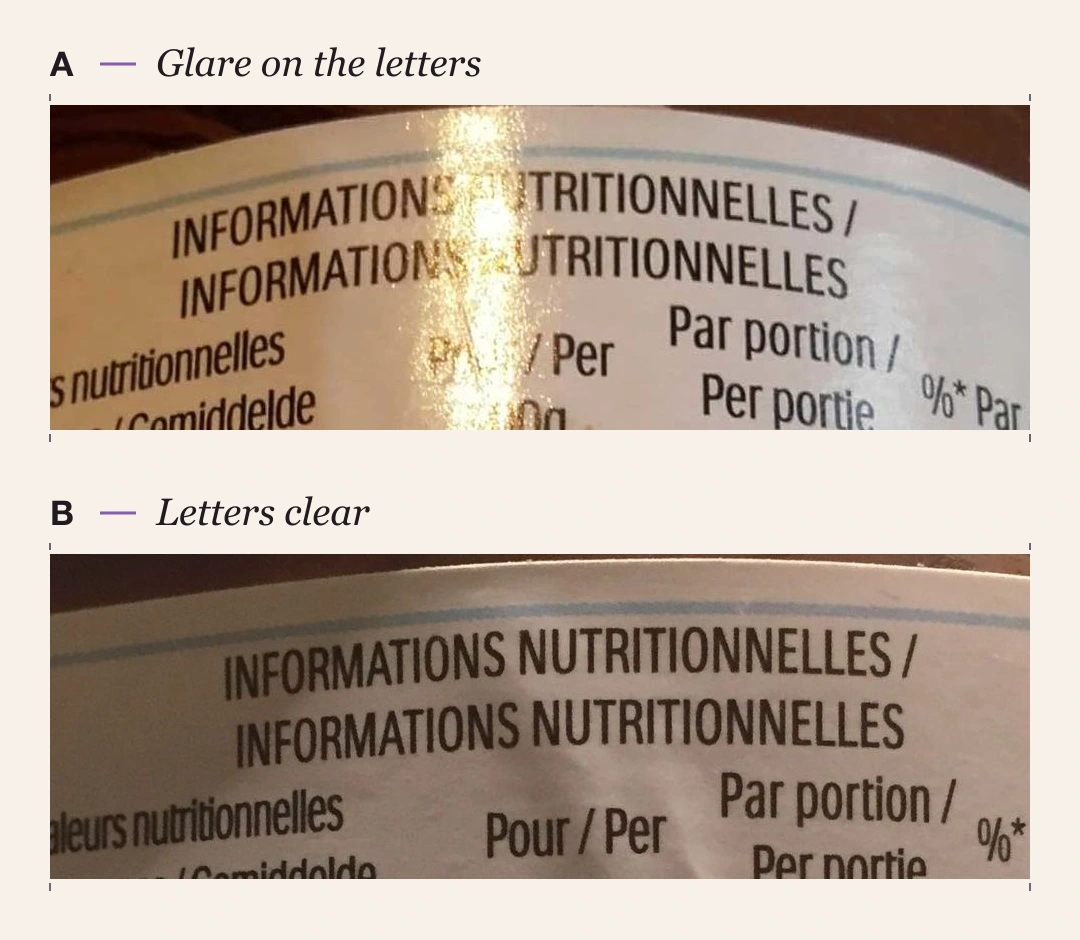
Look at the two photos of the same Nutella product below. In A, a narrow reflection crosses the heading and the first column of figures. In B, both lines of the heading are visible. If someone needs to read the heading, B is the better starting file.
Step 2: Move the reflection while keeping the label facing you
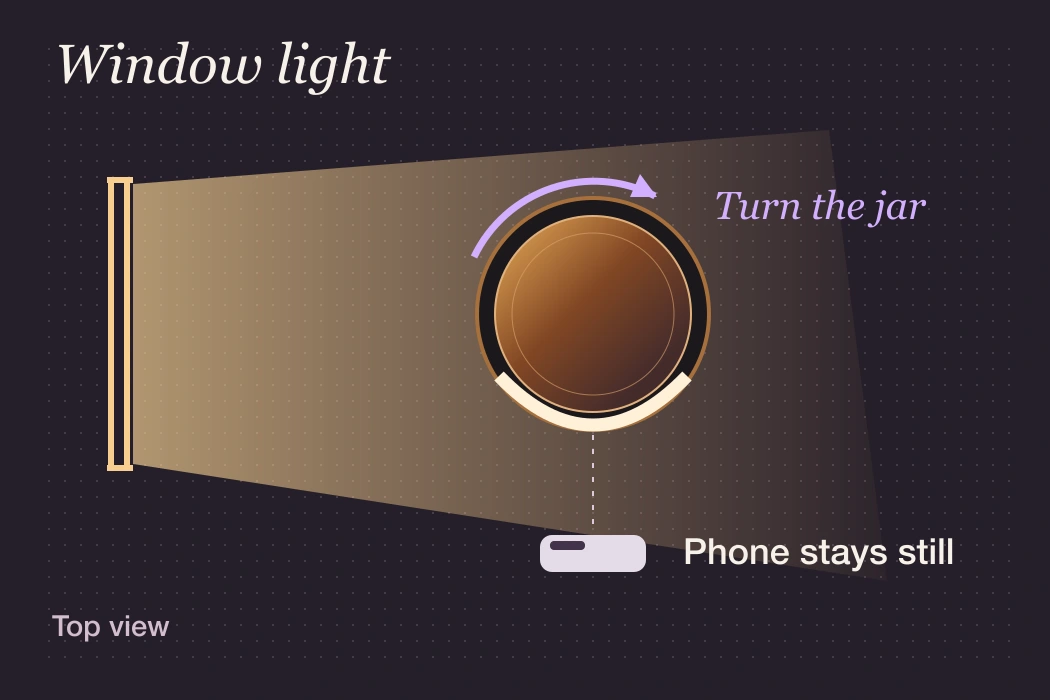
Start with the window to one side of the table. Face the printed panel toward the phone and take a reference shot. On the live camera view, turn the package slightly one way, then the other. Watch the bright stripe where it meets the first letter of your chosen line. Take the second frame when the stripe clears the last letter and the panel still looks square to the camera.
If turning a pouch or carton hides part of the name around an edge, turn it back. Move the phone and package together to a different angle to the window, keeping them facing each other. If the opposite side now looks too dark, stand the white paper on that side and slide it nearer while watching the lettering. Stop if the paper itself appears as a bright rectangle across the text.
Step 3: Read the same line in both frames on your phone
Open the two files, alternate between them and read the same words each time. The label comparison above shows why exposing the whole shot a little darker can be the wrong first move. In A the dark letters on either side of the stripe are already visible. The missing contrast is confined to the patch of reflected light. In B the two lines of the heading run through without that interruption.
Now view the entire photo at the size you plan to post. Can you read the product name and tell one variant from another without pinching to zoom? If the line is sharp when enlarged but tiny in the full image, the remaining problem is framing. Fill more of the frame with the panel or make the detail a second image. If every letter looks soft even at full size, steady the phone, tap the lettering to focus and take another shot.
Step 4: Save a clean reference for the person making the post
Keep a whole-package shot for recognition and a straight-on detail for the wording. Give them distinct names, such as “jar-front” and “jar-label-detail”. If you’re sending the pair to an editor, identify the exact wording or variant they should match. Ask them to check the final crop on a phone before using it. For a product video, the detail shot can also be the reference when a moving highlight passes across the package.
When to reshoot
- The label clears, but the package looks crooked. Return it to a front-facing position and change the angle to the light instead.
- Only part of a curved label is sharp. Take a second view of the next panel. A customer can swipe to another image more easily than decipher letters disappearing round the jar.
- A bright patch stays in both frames. Check for a second light reflected in the package, such as an overhead bulb. Switch that light off and compare one more pair.
FAQ
Do I need to remove every reflection?
No. A slim highlight at the shoulder of a jar can help a customer see its shape. Keep it if the name, variant and detail you chose are clear.
Where should I put the product relative to a window?
Begin beside the window with the light coming from one side. Watch the actual label on your phone as you adjust. A flat carton and a curved jar can reflect the same window in different places.
How do I tell if small print is readable on a phone?
Read one specific line in the final crop at ordinary viewing size. Then enlarge the original. If the original is sharp, supply a tighter detail. If letters disappear into a white streak in the original, retake it.
Will editing a bright spot restore the letters?
Try a modest exposure adjustment on a copy. If the white patch turns gray but the letters still have no edges, use the other frame or take a new one. Use the package as your reference for any wording.
Which photo should I send to Stillmore?
Send the clear front view and include the label detail when the wording matters. Check the selected style’s material requirements in Inspiration before submitting.
Photo credits
Crops from two contributor photographs of Nutella, barcode 3017620422003, via Open Food Facts: photo A and photo B. Photos and adapted comparisons: CC BY-SA 3.0. The photos document the visible reflections; their lighting setups were not recorded.



About the author
Lan He
I'm Lan. Years of writing promotional and editorial work in the US, mostly for companies with big audiences and bigger expectations — where a single article might reach hundreds of thousands of readers, and where the good ones kept earning traffic long after the campaign ended. I learned what makes a page survive that: one clear audience, one real question, images that show the actual work, and a structure that keeps people reading. Now I write for small business owners who do everything themselves, answering the questions they actually ask: what's worth posting, which photos are worth taking, and how to tell one story across images, video, and words. I've seen good content carry a small company further than its ad budget ever did.
Give them a reasonto stop by.
Send us your phone photos. Get posts ready to share.
See what we can make