



How to Write an Instagram Caption for an Event Flyer
SUMMARY
Could a guest plan a visit from your Instagram caption alone? Follow a fictional bookshop as it checks a workshop flyer against its booking page, fixes a conflicting start time and writes a post guests can use to reserve a seat. The example pairs a complete caption with alt text for the illustration. Use the four-question checklist with the flyer hidden to see whether a reader can tell what the event costs, when and where to arrive, and how to get a spot.
Contents
Write the caption so someone can decide whether to attend without seeing the flyer. Lead with what’s happening and when. Give the address, price and any requirements, then tell readers how to get a spot. Use the image’s alt text to describe what the flyer shows.
Quick version
- Check the flyer against the event listing and resolve any differences.
- Put the details a guest needs near the start of the caption.
- Give one booking or walk-in instruction and write alt text for the image.
- Hide the flyer and try to plan a visit using the caption alone.
Before you start
Have the final flyer, the organizer’s confirmed event details and access to the shop’s public Instagram profile. For an event that requires reservations, have the booking page handy. This example uses a fictional shop, Finch Street Books, and its bookplate-printing workshop.
Write and check your event post
Step 1: Check the flyer against the booking page
Lay the flyer beside the event listing. Compare the event name, date, start and end times, venue, price and booking requirement. Say the shop’s flyer lists a 1 p.m. start but the booking page says 2 p.m. Ask the person running the workshop which time guests should arrive. In this example, the bookseller confirms 2 p.m. and corrects the flyer. Check the corrected image at full size. A customer who saves it should see the same start time as someone who books.
Step 2: Put the guest’s decision first
Give readers enough in the opening line to picture the activity and check their calendars. “Print a set of bookplates for your home library on December 5” tells them what they’ll take home. Follow with the time and street address, then details that might change their plans. Here, the $12 fee covers materials and every guest needs a reservation. Someone reading the first few lines should be able to decide whether the workshop fits their interests, schedule and budget. UC Berkeley’s guidance on accessible social media images also recommends putting essential event information near the top of the caption.
Step 3: Test one booking instruction and describe the flyer
Open the shop’s profile as a visitor and follow the route you plan to name. For Finch Street Books, the profile link labeled “Bookplate Workshop” should open reservations for the December 5 session. Use the wording visitors actually see. Then look at the image: this flyer shows a hand lifting a stamp from a bookplate. Give that detail in the image’s alt text field. The University of Arizona explains how to pair readable post text with alt text in its accessible flyer guide.
Example caption
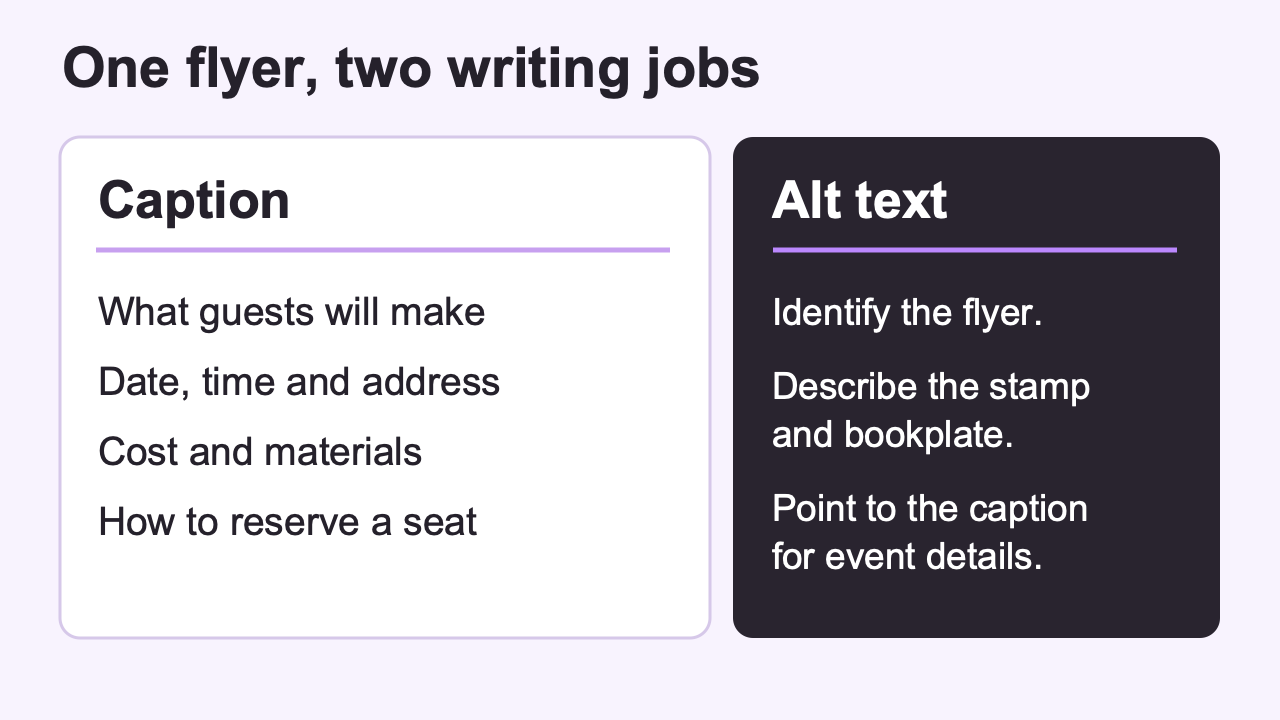
Print a set of bookplates for your home library on Saturday, December 5, 2026, from 2 to 3 p.m. at Finch Street Books, 18 Finch Street, Portland, Oregon.
The workshop costs $12 per person, including paper, ink and stamps. Reserve your seat through the “Bookplate Workshop” link on our profile.
Matching alt text
Bookplate Workshop flyer showing a hand lifting a stamp to reveal an open-book design on a paper bookplate. Event and booking details are in the caption.
Illustrative example.
Step 4: Hide the flyer and plan a visit
Copy just the caption into a blank note. Ask someone who hasn’t seen the flyer to use the note and your public profile to answer these questions. Keep this checklist for the next event, too.
- What will I do, and what will it cost me?
- Which day should I come, and at what time?
- What address would I enter for directions?
- How do I get a spot, and does that route reach the right event?
If they have to ask you for a detail, add it where they first needed it. Read the revised note once more before posting.
Common mistakes
- Leaving a QR code as the only way to book. Someone reading the caption needs a route they can follow on their phone. Name the tested route in the text.
- Writing “this Saturday.” A saved post may turn up weeks later. Include the calendar date.
- Calling a workshop “free” when only admission is free. Spell out any materials fee so a guest knows what they’ll pay.
FAQ
What if people can walk in?
Say “Walk in between 2 and 3 p.m.” if that matches the organizer’s plan. Include a last entry time if guests need to arrive before the session ends.
What if the shop has two locations?
Name the hosting branch and give its street address and city. Check that the booking page names the same branch.
Where should I mention an accessible entrance?
Put confirmed arrival instructions alongside the address. A detail such as “Step-free entrance on Elm Street” helps guests choose the right door.
What if the workshop sells out after I post?
Update the caption and booking page with the current availability. If a waitlist opens, replace the reservation instruction with the route to that list.
Next step
Enter your checked caption and alt text alongside the final flyer. If you hand off production, send the confirmed details and your shop photos to the team preparing the post. Stillmore’s Instagram content creation service can prepare images and captions from those materials. Your shop verifies the event details and publishes the post.

About the author
Lan He
I'm Lan. Years of writing promotional and editorial work in the US, mostly for companies with big audiences and bigger expectations — where a single article might reach hundreds of thousands of readers, and where the good ones kept earning traffic long after the campaign ended. I learned what makes a page survive that: one clear audience, one real question, images that show the actual work, and a structure that keeps people reading. Now I write for small business owners who do everything themselves, answering the questions they actually ask: what's worth posting, which photos are worth taking, and how to tell one story across images, video, and words. I've seen good content carry a small company further than its ad budget ever did.
Give them a reasonto stop by.
Send us your phone photos. Get posts ready to share.
See what we can make
Keep exploring
All stories ↗- Social media
How to Add Clear Entrance Photos to Google Maps
Learn how to help first-time visitors recognize your street-level or shared-building entrance on Google Maps using a verified Google Business Profile. This guide walks you through mapping real customer approaches on foot, photographing every turn, outer facade, lobby, and suite door during open hours, and selecting accurate, natural JPG or PNG frames that make sense in any order without arrows or diagrams. You will also learn how to upload photos on desktop, monitor owner-only Live status, confirm public visibility, avoid common mistakes, and reuse entrance shots for social posts.
- Social media
How to fix an outdated menu photo on Google Maps
An old menu photograph can keep showing prices you no longer charge. This guide helps you identify who uploaded it, choose the appropriate removal or reporting route, and add a readable current menu. Follow a hypothetical cafe example to check the menu link and written prices, then record what guests can actually see. A new upload and a removal request can have different outcomes, so the final checklist keeps completed changes separate from anything still awaiting review.
- Social media
Turn a 16:9 photo into a Reel and test its reach
A wide dining-room photo becomes a six-second vertical Reel in this walkthrough. Play the sample, see how the opening question leads into a closer view, and use the same sequence with your own photo. Then change one line and compare accounts reached and average watch time after the same interval. If your goal is menu or store visits, the guide explains which link data you need to measure those separately.