



How to Create a Product Demo Video for a Physical Product
SUMMARY
What would a shopper need to see to understand how your product works? Use a folding phone stand as an example to plan three shots that answer one question. Choose a camera angle that shows the moving parts, film the action in one take, and trim the clips without cutting away the moment that matters. Once you save the video, play it on a muted phone. If a viewer misses a step, use what they missed to decide whether to move a label or film the action again.
Contents
Pick one question a shopper could answer by watching your product work. Use your phone to film the starting position, the action in one continuous take, and the result. Join the shots and export the video. On a muted phone, a viewer should be able to point to the moment that answers the question.
Quick version
- Write down a buyer question and the action that would answer it.
- Plan three shots around that action.
- Record the whole movement with the working parts in view.
- Trim the clips, put them in order, and save a video file.
- Watch the saved file on mute and fix anything a shopper has to guess.
Before you start
Gather the item you sell, a phone to record it, and anything a buyer needs to use the feature. Set the recording phone on a stable support so you can use both hands. You'll also need an editor that can join clips and export a video. A listing photo is optional for the opening shot.
The example below uses a hypothetical folding phone stand. To film it, you'd need a second phone to place on the stand. Borrow one if necessary, and check that it fits before you set up the camera.
Step 1: Choose a question the camera can answer
Write the shopper's question in their words. For the folding stand, try “How do I set my phone on it?” Underneath, describe what someone should see. The stand starts flat. A hand unfolds the back support, places a phone in the cradle, then lets go. You have a filmable question when you can name the frame that answers it. Here, that's the phone resting on the open stand with both hands clear.
Step 2: Plan three shots around the moving part
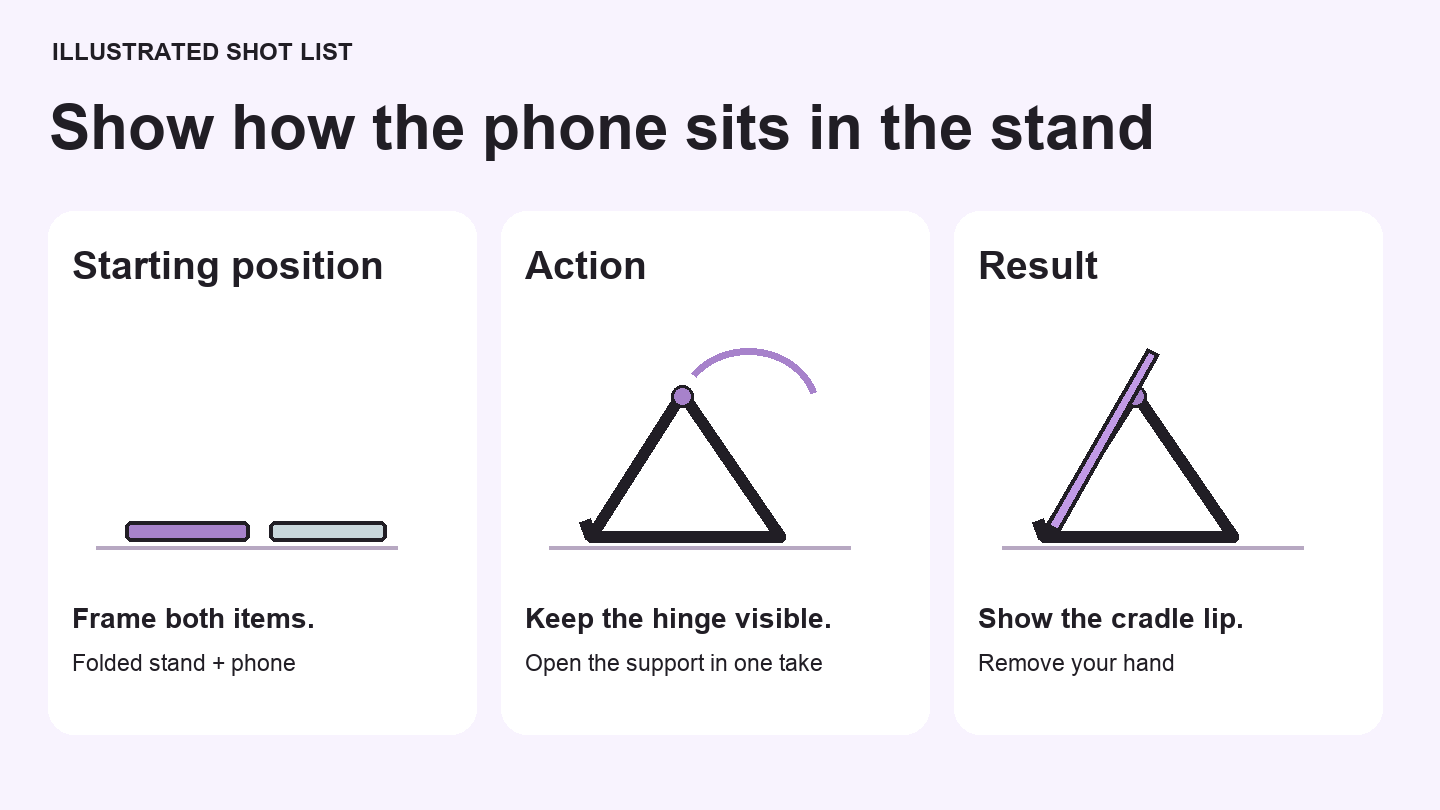
Put the stand on a plain table and look through the camera while you open it. A side view may show the hinge clearly but hide the lip that holds the phone. Turn the stand slightly until you can see both. Use this shot list as a starting point.
| Shot | What to film | What to check |
|---|---|---|
| Starting position | Folded stand beside the phone | Both items are recognizable. |
| Action | Open the stand, seat the phone, and let go | The hinge and cradle stay in frame throughout. |
| Result | Phone resting on the stand, viewed from the side | The bottom edge sits visibly behind the lip. |
Step 3: Film the action in one continuous take
Record the folded stand first. For the action shot, start recording before your hand enters the frame. Reach in from the side farthest from the lens, open the support, and lower the phone into the cradle. Take your hand away and leave the camera running for a moment. Now move the camera closer for the result shot, leaving the phone exactly where you placed it.
Replay the action clip before you clear the table. Can you see when the hinge opens and when the cradle takes the weight of the phone? If your thumb covers either moment, shift your grip and record the movement again.
Step 4: Trim the clips and export the video
Place the three shots in order in your editor. Trim the time you spent walking back to the table. Keep the action intact from the first touch through release. If the hinge is hard to identify, add a short label such as “Open the back support” in the empty space beside the stand.
Export the finished sequence to your phone. Open the saved video from your photo library or files app and play it through to the final shot. This checks that you have a playable file outside the editing project.
Step 5: Check the answer with the sound off
Mute your phone and watch the export at its normal size. Ask someone who hasn't handled the stand to watch once, then describe how they'd set it up. If they miss the back support, replay that part together. A label covering the hinge calls for an edit. A hand covering the hinge calls for another take. Export any correction and repeat the muted check. For a fuller check before posting, use the product video draft review guide.
When you have product photos
If you want a video that introduces the stand's shape or highlights a detail visible in your photos, you can hand those photos to Stillmore. The team plans, produces, and checks the creative. You publish the finished piece. Keep your filmed clip for shoppers who need to see exactly how the hinge moves. Explore product demo video production from photos.
Common mistakes
- Cutting as the phone lands. A cut at that instant hides how the cradle works. Extend the take until the hand is clear.
- Changing the angle between takes. If the stand opens wider in the last shot, the result looks like a second setup. Match the angle to the end of the action clip.
- Claiming every phone fits. One demonstration shows the fit of the device on screen. Name that model if you know it, and keep broader compatibility claims out of the caption.
FAQ
Can I use my listing photo for the first shot?
Yes, if it shows the same model and starting position as the clip. A photo of the stand already open works better at the end.
How long should I hold the final shot?
Give a viewer enough time to see where the phone rests after your hand leaves. Play the ending once at normal speed. If you have to pause to find the point of contact, hold the shot longer.
Should I add a voiceover?
Add one if the shopper would benefit from a spoken instruction, such as which edge to lift first. Keep that edge visible so the instruction also makes sense on mute.
What if my product has two features worth showing?
Give each feature its own demo when it answers a different question. Setting up the stand and folding it for travel can each start with the position a shopper would actually have in front of them.
Next step
For ideas on presenting the same product in your next post, browse the sample videos in Stillmore Inspiration.

About the author
Lan He
I'm Lan. Years of writing promotional and editorial work in the US, mostly for companies with big audiences and bigger expectations — where a single article might reach hundreds of thousands of readers, and where the good ones kept earning traffic long after the campaign ended. I learned what makes a page survive that: one clear audience, one real question, images that show the actual work, and a structure that keeps people reading. Now I write for small business owners who do everything themselves, answering the questions they actually ask: what's worth posting, which photos are worth taking, and how to tell one story across images, video, and words. I've seen good content carry a small company further than its ad budget ever did.
Give them a reasonto stop by.
Send us your phone photos. Get posts ready to share.
See what we can make
Keep exploring
All stories ↗- How it works
How to review a product video draft and give your editor feedback
Suppose your coffee shop’s new video shows last season’s packaging and ends with an expired discount. Follow this example to check your own draft against a current product photo and the offer customers can use. Copy the feedback table to tell your editor which shot to replace, when it appears and what belongs there. Once you’ve agreed on the required fixes, watch the revised cut from start to finish and record which file is ready to publish or what still needs work.
- How it works
How to reuse your business photos with Stillmore
What’s for dinner, and where would we sit? A restaurant can answer both questions with photos it already has. Using photos from Osteria Sole, this guide shows how to turn those questions into two briefs, each with its own lead image and details to confirm. You’ll also see how to compare the room photo with a frame from the finished video and decide when a change to your menu or space calls for a fresh shot.
- How it works
How to fix a rejected DoorDash menu photo
When DoorDash flags an item photo, start with the order a customer would actually receive. A bowl of mushroom pasta gives you a way to spot extras that could be mistaken for part of the meal. Use the edge of the bowl and the size of the exported file to decide whether a crop will work or whether to plate another serving. Then check the corrected photo against the rejection notice and send it back for review on the right listing.