



How to reuse your business photos with Stillmore
SUMMARY
What’s for dinner, and where would we sit? A restaurant can answer both questions with photos it already has. Using photos from Osteria Sole, this guide shows how to turn those questions into two briefs, each with its own lead image and details to confirm. You’ll also see how to compare the room photo with a frame from the finished video and decide when a change to your menu or space calls for a fresh shot.
Lan He
Contents
Start with a question a customer might ask today. A photo of a plated fish can answer “What could I order?” A photo of the dining room can answer “Where would we sit?” You can use the same collection for both posts. Give each one its own lead photo and check that what it shows is still available.
Quick version
- Sort your existing photos by what customers can see in them.
- Choose a different lead photo for each customer question.
- Send the photos with one short brief for the piece you want first.
- Compare the finished piece with the original before you share it.
Before you start
Open your camera roll or Stillmore Library alongside whatever you use to check current details, such as today’s menu. Find the original files if you have them. You’ll also need to know who can confirm the details in each shot. The person serving dinner tonight can tell you whether the fish still comes with that garnish.
The Osteria Sole gallery gives us a collection to work through. It includes close-ups of individual plates as well as views of the dining room. The two example briefs below are ones you can adapt for your business.
Make two briefs from one photo collection
Step 1: Pick the photos you could stand behind today
Open a photo at full size. Name the one thing a customer would expect to find after seeing it. For a dish, that might be the portion and how it’s served. For a room, it might be the long table by the wall. Put the photo aside if the answer depends on something you haven’t checked, such as an old special or a terrace that has since closed.
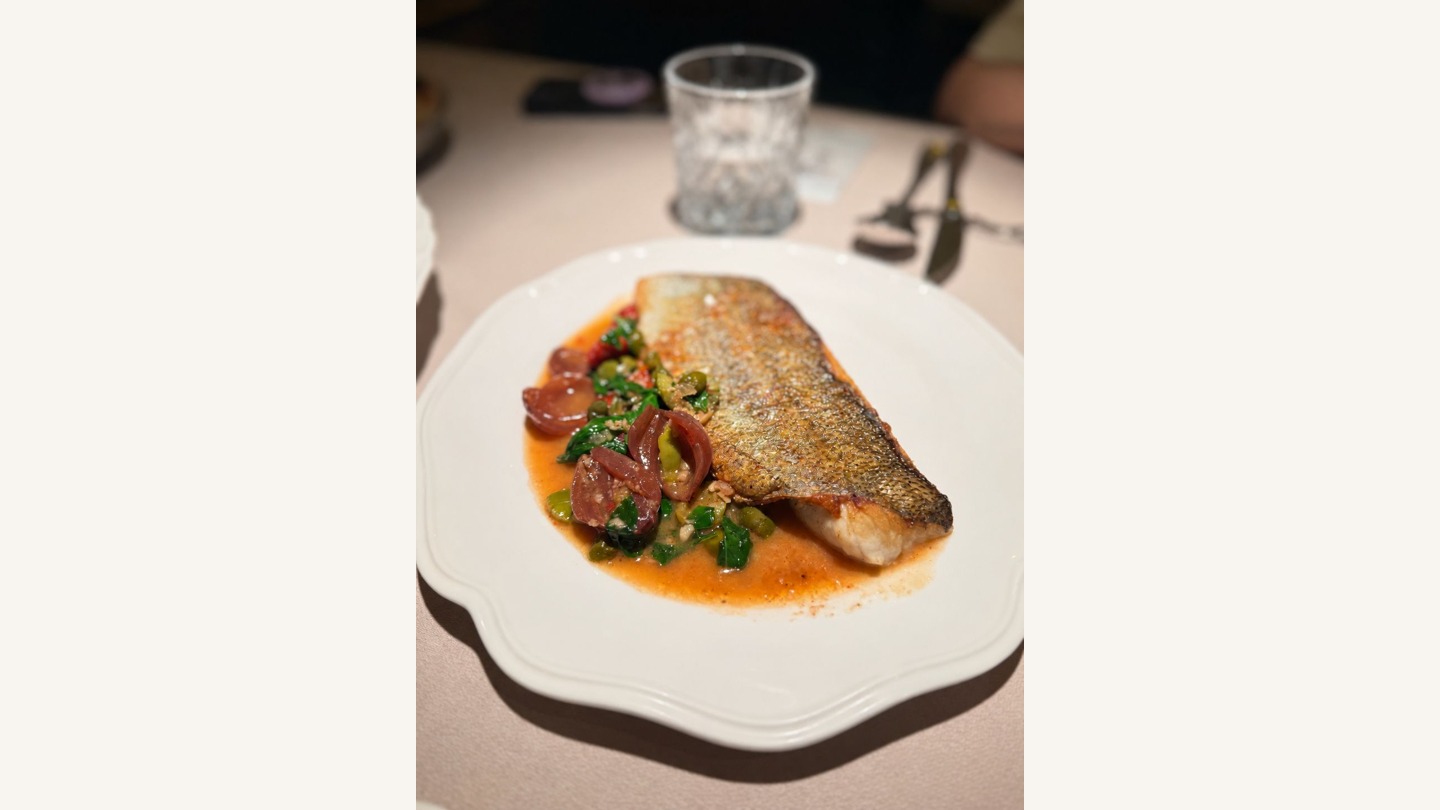
Use the original with a clean view of the subject. In the fish photo below, you can see the browned skin, the sauce and the white plate. Those are useful details for someone checking the finished piece later. A screenshot with an old price across the fish would give them less to work with.
Step 2: Give each post a different lead photo
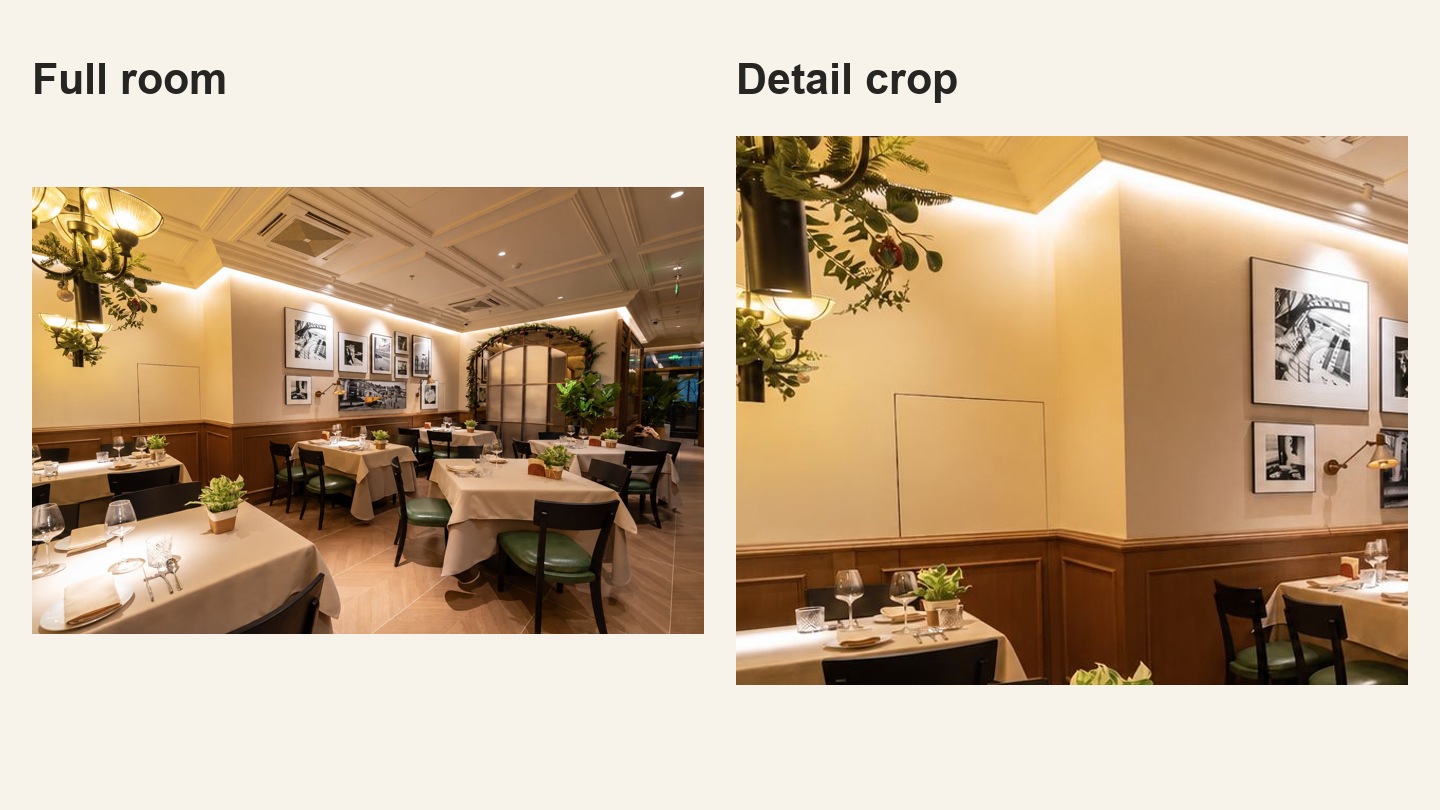
Imagine answering two messages from guests. One asks what dinner looks like. Send the plate close-up. The other is choosing somewhere to meet friends. Send the room photo where they can see the tables and chairs. For the seating question, compare two framings of the same room. The closer crop draws attention to the wall but leaves little of the seating in view. In the full photo you can see how the tables sit in relation to the arch. Use the full photo to lead the room brief.
Before sending either photo, check the detail the guest is relying on:
- For the dish post, ask the kitchen whether the portion and garnish on the white plate match what goes out tonight.
- For the room post, check that the tables are still arranged as shown. If you mention reservations, confirm the booking details separately.
Will this horizontal photo work in a vertical post?
Try a 9:16 frame on a copy, then look at it on your phone. For the dish, can you still tell what a guest gets? For the room, can you see where guests would sit?
- Crop if the portion, label or other detail the customer needs stays clear at normal phone size.
- Keep the full photo if it is sharp but the crop cuts that detail off. Fit it inside the vertical frame and use the spare space for a short caption. Check that the subject is still large enough to recognize.
- Retake if the important detail is already blurry, hidden or too small in either layout. Photograph just the missing view and keep the rest of the set.
Keep the original and send your trial alongside it if framing matters to the brief. If the deliverable is a Reel, the one-photo Reel walkthrough shows a finished example using this room.
Step 3: Send one brief for the piece you want first
Pick the post you have a reason to share this week. In Inspiration, choose a style and check which photos it calls for. If you prefer to leave the creative choice to Stillmore, its team can select suitable photos from your Library when automatic creation is enabled. A specific menu item or a particular room is a good reason to pick the materials yourself.
Example brief for a dish post: “Lead with the fish on the white plate. Keep the skin and sauce visible. End with a prompt to check our current menu.” Add the dish name and menu link after the kitchen confirms them.
Example brief for a room video: “Open on the dining room facing the arch. Keep the framed wall in view so guests recognize the room. End with our reservation link.” Use a link a guest can actually book through.
Keep the second brief for the next occasion. Hand each brief to someone who hasn’t seen the other one. Can they pick the right file, name the detail to keep and tell a guest what to do next? If so, the brief is ready.
Step 4: Check the result against the original
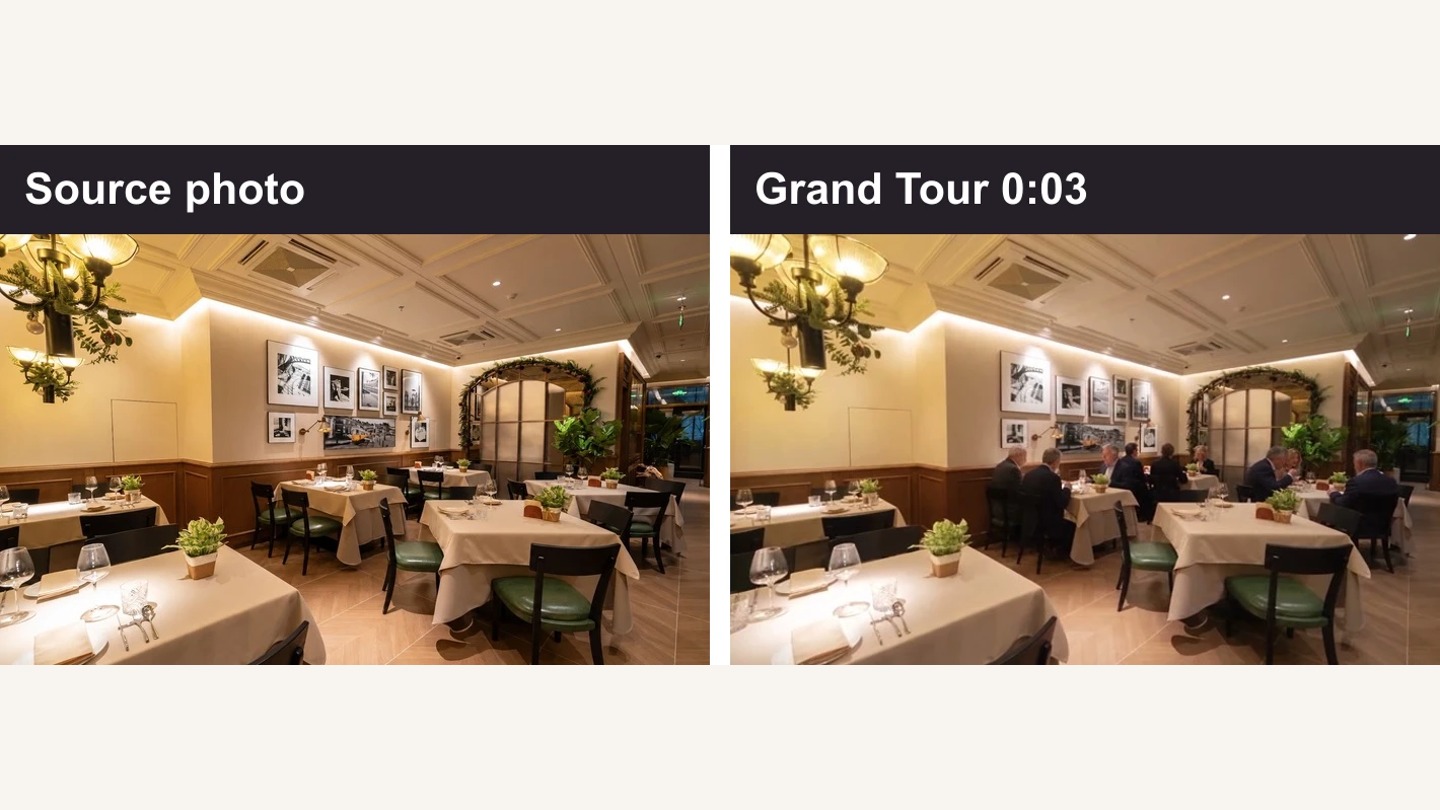
Open the finished work in My Creations. Pause on the shot a customer is most likely to remember and put the original beside it. In Osteria Sole’s Grand Tour video, pause around three seconds. The gallery wall and leafy arch let you recognize the same room. Guests appear at tables that were empty in the source. The scene can illustrate the atmosphere. It wouldn’t be evidence of how busy the restaurant was that night.
For the fish brief, inspect the plate the same way. If the portion has doubled or the sauce has changed, flag the frame and send the original as the reference. Then read the caption on its own. A faithful picture can still carry an expired offer. Once both match what a customer can get, download the piece and share it on your own account.
When to take one more photo
If guests ask where the outdoor tables are and all your pictures show the dining room, take a current shot from the terrace entrance. If a dish now comes in a different portion, photograph the plate as it leaves the kitchen. One missing detail calls for one targeted shot. Keep the rest of the collection for the questions it can still answer.
FAQ
Can I use a photo I already posted on Instagram?
Yes, if you can use it again and it still represents the business. Look for the original on your phone so last season’s price, caption or stickers don’t appear in the new piece.
Which files should I send after trying a vertical crop?
Send the original for editing. If you have a preferred crop, label that copy as a framing reference and name the detail you want the team to preserve.
Can I choose which photo Stillmore uses?
Yes. Pick an Inspiration and submit the materials for that style. This is useful when one exact product or dish needs to appear. The Stillmore FAQ explains how this differs from letting the team choose.
Do I need a different folder for every post?
You can keep the originals together. A note pairing each brief with a filename is enough to tell the dish request from the room request. Add the date you checked anything likely to change.
What if guests appear in the background?
Choose a frame you have permission to share. An empty-room photo can still show the layout, and a closer crop can often keep the focus on the meal.
Can an old dining-room photo promote a new event?
Use it to show the room if the layout is current. Get the event date, price and booking details from the organizer, and use a current photo if the event promises a different seating arrangement.
Try it with your own photos
Choose one question a customer asked this week. Find the one photo that answers it, write down the detail you need to confirm, and use those two lines as your first brief.

About the author
Lan He
I'm Lan. Years of writing promotional and editorial work in the US, mostly for companies with big audiences and bigger expectations — where a single article might reach hundreds of thousands of readers, and where the good ones kept earning traffic long after the campaign ended. I learned what makes a page survive that: one clear audience, one real question, images that show the actual work, and a structure that keeps people reading. Now I write for small business owners who do everything themselves, answering the questions they actually ask: what's worth posting, which photos are worth taking, and how to tell one story across images, video, and words. I've seen good content carry a small company further than its ad budget ever did.
Give them a reasonto stop by.
Send us your phone photos. Get posts ready to share.
See what we can make
Keep exploring
All stories ↗- How it works
How to fix a rejected DoorDash menu photo
When DoorDash flags an item photo, start with the order a customer would actually receive. A bowl of mushroom pasta gives you a way to spot extras that could be mistaken for part of the meal. Use the edge of the bowl and the size of the exported file to decide whether a crop will work or whether to plate another serving. Then check the corrected photo against the rejection notice and send it back for review on the right listing.
- How it works
How to photograph a shiny product label without glare
A reflection can show the curve of a jar or hide the words a customer came to read. Two photographs of the same Nutella product show the difference. Use them to judge a bright streak on your own packaging, then try a pair of shots beside a window. The guide walks through keeping the label square, checking one line at phone size, and choosing between a tighter crop and a fresh photo before you send the files to an editor.
- How it works
How to make a store tour video from photos
Learn how to turn current photos of your store into a brief for a tour video. This guide covers planning a visitor’s route, choosing entrance and interior photos, recording accurate business details, and handing the materials to Stillmore’s team. It includes a photo checklist, an example creative brief and a review checklist for the finished work. See where a cinematic tour differs from an exact walkthrough, what the published Grand Tour materials guide asks for, and what to check in the video and caption before publishing from your own social account.